Working with Kettle
Lately I've been using the ETL tool Kettle, getting to know and put to work its features for syncing, migrating, transforming, and correcting data across multiple data sources.
Building business systems, you run into this kind of requirement all the time: the old system's data needs to move to a new system, and the two have different table structures; or data from several databases needs to be rolled up into one reporting database, with mismatched field names, status codes, and data types. Handling this entirely by hand-written scripts — piles of SQL plus import/export programs — means rewriting code every time the requirements change, which gets tiring to maintain. That's exactly what ETL tools solve: they turn the three steps of Extract, Transform, and Load into a visual, workflow-driven process. Kettle is a fairly representative open-source implementation of this kind of tool.

Kettle — a "kettle," true to its name — treats the table data in various sources as flowing water, and gathers, splits, and parses those streams. It's an open-source data integration tool offering rich data-processing features, including extract, transform, and load (ETL). At its core is a graphical design tool where users build data-processing flows through simple drag-and-drop and connection operations. Kettle also ships with a powerful processing engine that supports multithreading and distributed processing, letting it handle large-scale data efficiently. It supports a wide range of sources and targets — relational databases, files, web services, and more — making it easy to integrate with all kinds of data sources. Kettle also provides a rich plugin mechanism, so users can develop custom plugins to extend its capabilities. In short, Kettle is a powerful, easy-to-use, and highly extensible data integration tool, widely used in data warehousing, business intelligence, data analysis, and similar fields.
How it works
Kettle has two basic concepts: Transformations and Jobs. A Transformation handles the actual data flow, built from individual Steps linked by Hops, with data flowing between steps one row at a time. A Job is the higher-level scheduling unit, organizing multiple Transformations to run in sequence or by condition. The flow you draw in the graphical designer, once saved, is an XML description file — you can run it directly in the designer, or hand it off to a command-line tool for scheduled execution on a server.
At runtime each step is an independent thread: as soon as an upstream step produces a row, it pushes that row downstream, so the whole flow is pipelined and doesn't wait for the previous step to finish everything. This is one reason it can handle sizable data volumes — the data isn't loaded into memory all at once.
No programming needed; you just drag components and configure them by hand to accomplish complex data-processing tasks. As for CDC, Kettle reads and transforms data using a query-based approach, which suits one-off data migration and transformation. It's not for scenarios with high real-time requirements.
A bit more on that: CDC (Change Data Capture) generally comes in two flavors. One is log-based — for example, parsing MySQL's binlog — where every database change can be captured in near real time. The other is query-based, running SQL on a schedule and comparing timestamps or auto-increment keys to find the changed rows. Kettle belongs to the latter camp: what it sees is a snapshot at the moment of the query, blind to any intermediate states between two queries, and deletions are hard to detect. So it fits one-off migrations and scheduled batch syncs; for real-time sync you need to switch to a log-based approach.
A small migration example
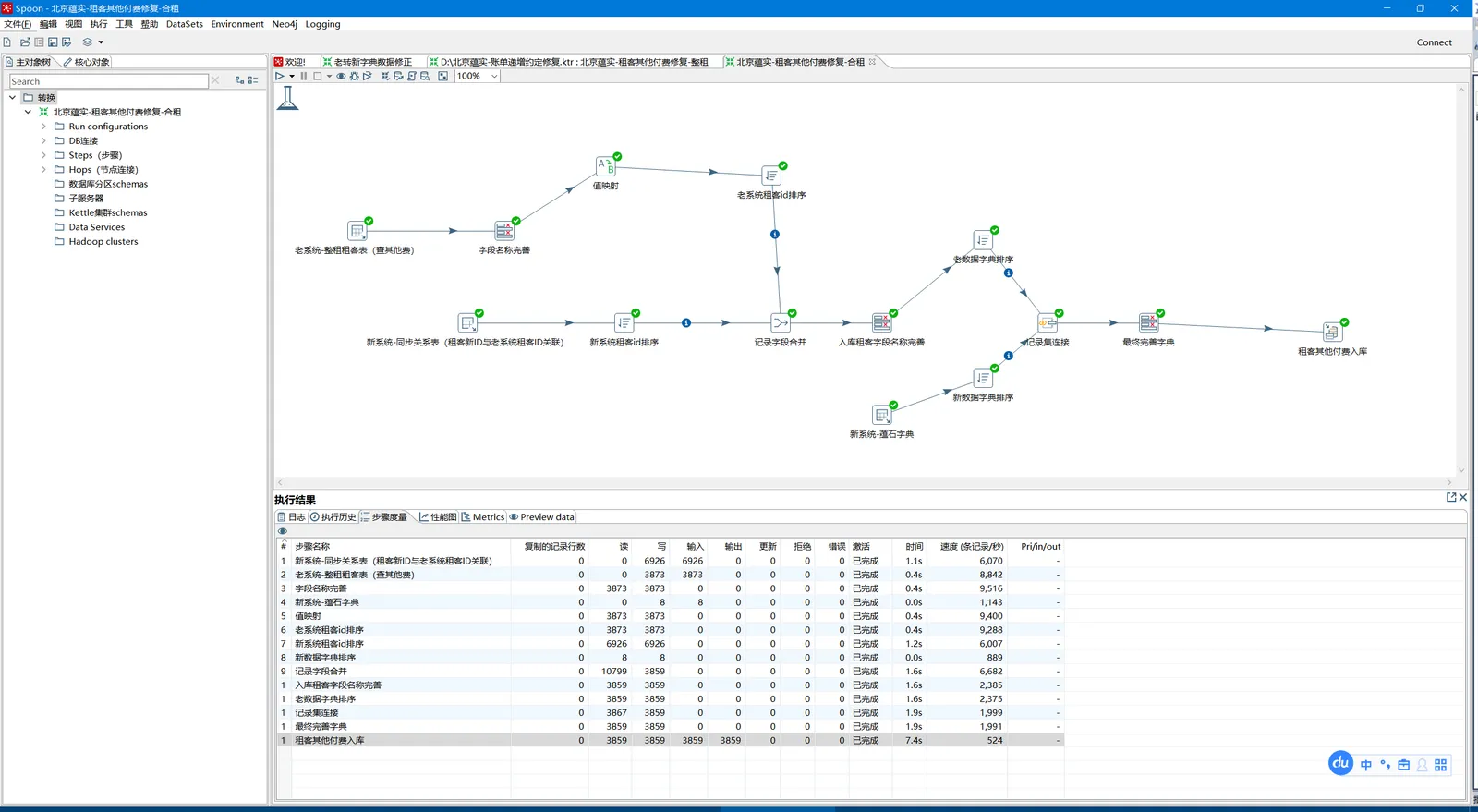
Kettle offers quite a lot of components to cover different scenarios for moving, importing, exporting, and value-mapping data, and it can export data to Excel files. The image above is a typical migration flow: query data out of the source database, run it through a few cleanup and transformation steps in the middle, and finally write it into the target database. Below, I'll go through these common components in the order they appear in the flow.
Table input: runs SQL against a database to query out the data to import. This is the flow's starting point — write a SELECT statement, and each row of the result becomes a row in the data stream passed downstream. You can parameterize the SQL with variables, making it easy to reuse the same transformation across different environments.
Table output: takes the final result set produced by Kettle and writes it into a table. This is the flow's endpoint, INSERTing each incoming row into the target table. You can configure the batch commit size; batch writes are far faster than committing row by row.
Field renaming: lets you select data columns, set column aliases, and so on. Source and target table field names often don't match — say the old database calls it user_name and the new one username — so you unify the names in this step, and later steps no longer have to care about the source's naming. You can also drop unneeded columns right here, reducing the load on downstream steps.
Sort: sorts by data fields. Not much use on its own, but it usually serves the next step — Kettle's merge-type components generally require both inputs to be sorted by the join field, so you typically sort each side before merging.
Merge join: merges data from two different sources, similar to a MySQL join. Two table-input streams are joined together on the specified fields, so even tables across databases can be "joined" — something pure SQL can't do. The prerequisite, as noted, is that both streams be sorted by the join field first.
Value mapper: many databases use status codes like 1, 2, 3 that might become 4, 5, 6 in the new database — value mapping handles the substitution. It's essentially a lookup table configured inside the component, mapping source values to target values one-to-one, with an optional default to catch anything that doesn't match.
Field correction: fixes the source's field names and data types to ease migration into the new source. A classic case is the old database storing dates as strings while the new one uses a datetime type, or numeric precision that needs adjusting — convert it all in this step to avoid type errors when writing to the target database.
Insert / Update: performs inserts against the target source, and updates instead if a matching id already exists. This is the common upsert: look up the target table by the specified key fields, insert if not found, update if found. For incremental sync, use it in place of table output so the transformation can run repeatedly without producing duplicate data.
Pitfalls and things to watch
-
Garbled Chinese characters: the database connection's charset must match the database itself. It's best to explicitly specify the encoding in the MySQL connection parameters — otherwise you'll finish the migration only to find every Chinese character turned into a question mark, and have to redo it.
-
Forgetting to sort before merging: merge-type components depend on sorted input. Skipping the sort step won't necessarily throw an error, but the join results will be wrong, and that's harder to catch than an error — always double-check the row counts.
-
Batch commit and transactions: you can raise the table output's default commit size to speed things up, but think through what happens on failure — committed data won't roll back if something fails midway. Before rerunning, either clear the target table or switch to the Insert / Update component to guarantee idempotency.
-
Migrating large tables: an unconditioned SELECT pulling the whole table puts real pressure on the source database. Run it during off-peak hours where possible, or batch it by primary key or time.
Wrap-up
Used well, Kettle can simplify managing database data — during a major project version change, when reconciling the database structure and old-versus-new data, it's one of the good tools to reach for. Its positioning is clear: batch-style data moving and cleaning, with a graphical flow that lowers maintenance cost, sparing you from writing piles of throwaway scripts for these one-off or periodic data tasks. As for real-time sync, leave that to a log-based CDC approach — let each tool do what it's good at.
COMMENTS