Setting Up Redis Replication, Sentinel, and Cluster
Notes on setting up Redis in its three deployment modes: replication (master-replica), Sentinel, and Cluster. None of them is hard to deploy — it mostly comes down to writing the config files — plus an analysis of each mode's pros and cons.
Official site: Redis
Environment
OS: CentOS7
Redis version: Redis7.0.5
Replication (Master-Replica) Mode

Pros: Simple and quick to configure. Read/write splitting fully offloads read pressure from the master, and replicas can be chained — a replica can itself have replicas, nesting-doll style.
Cons: Not highly available — if the master goes down, you lose write capability. Heavy data redundancy: every replica holds a 100% copy of the master's data. As a non-HA architecture, it's rarely used on its own in production.
Setup Steps
- Configure the replica's redis.conf.
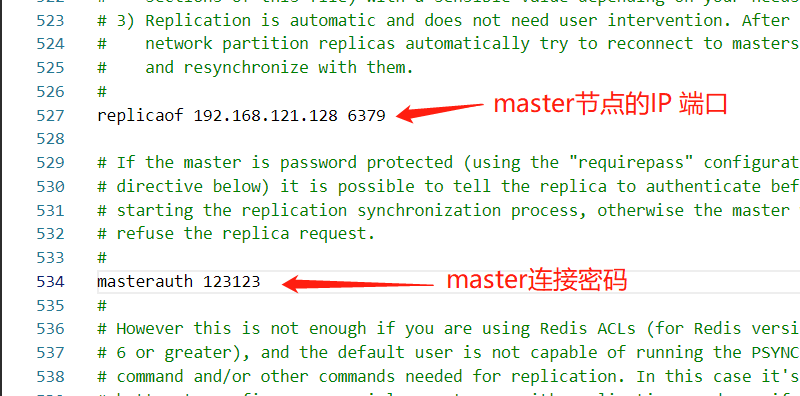
It's best to keep the master and replica passwords identical.
- Configure the master's redis.conf — just set the auth password and remote connection settings as usual.
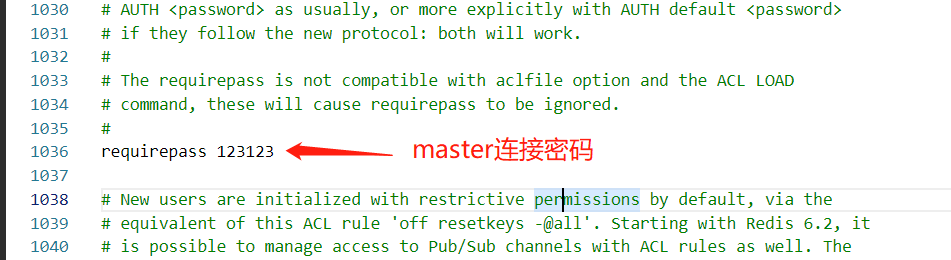

The result:


Sentinel Mode
Official docs: High availability with Redis Sentinel
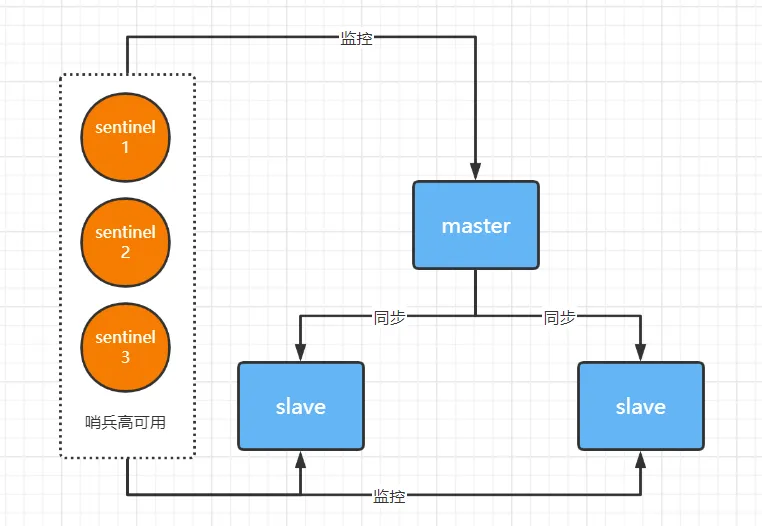
Pros: Sentinel solves the problem of losing writes when the master in a replication setup goes down. When the master fails, the sentinels detect that it's unavailable and elect a new master from the remaining replicas, restoring write capability. When the old master comes back up, it rejoins the cluster as a replica.
Cons: Data redundancy is still heavy, and sentinel nodes don't store data, so compute resources are wasted. Storage capacity doesn't improve, write capacity doesn't improve, and it's still centralized.
Deployment Notes
- Sentinel nodes themselves store no data.
- You need at least 3 sentinel nodes, and the count must be odd (leader election is Raft-based).
- Sentinel nodes must be deployed on their own, running only the sentinel process — no other applications. This avoids the sentinel entering TILT mode; other applications competing for hardware resources degrade the reliability of sentinel monitoring.
Sentinel mode is built on top of replication. One master, two replicas, plus three sentinels already adds up to six compute instances. In production, sentinels must be deployed separately — never on the master or replica nodes — to keep the whole cluster stable.

This mode is production-ready: a highly available architecture that preserves all of Redis's features.
Sentinel Node Setup Steps
Prerequisite: replication is already configured.
- Configure sentinel.conf with the master address to monitor. The sentinel automatically discovers the replicas from the master's info output.
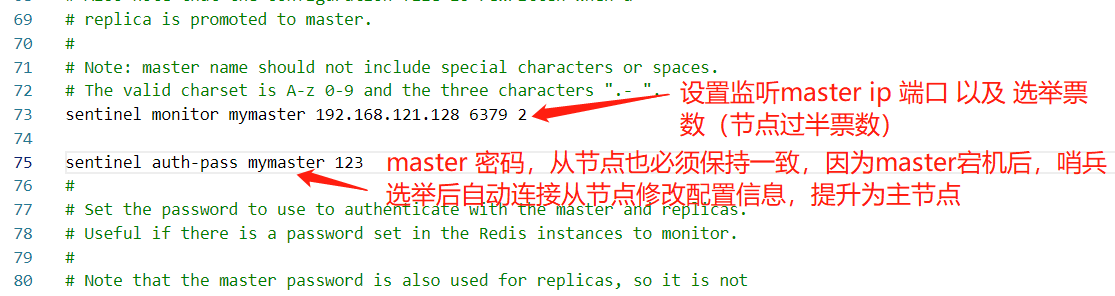
- Make sure all master and replica nodes share the same password.

-
Start the sentinel with the redis-sentinel command.
-
Configure the sentinel connection in spring-boot.
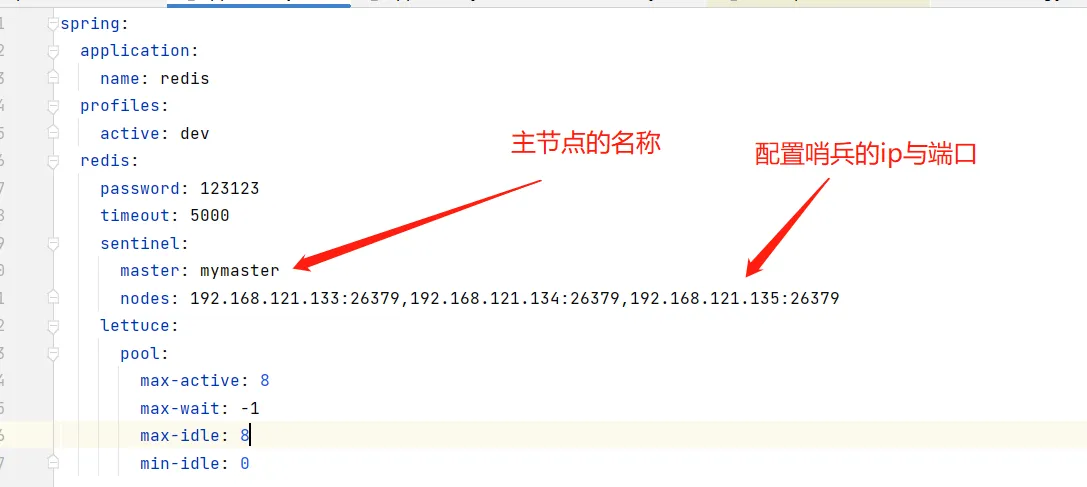
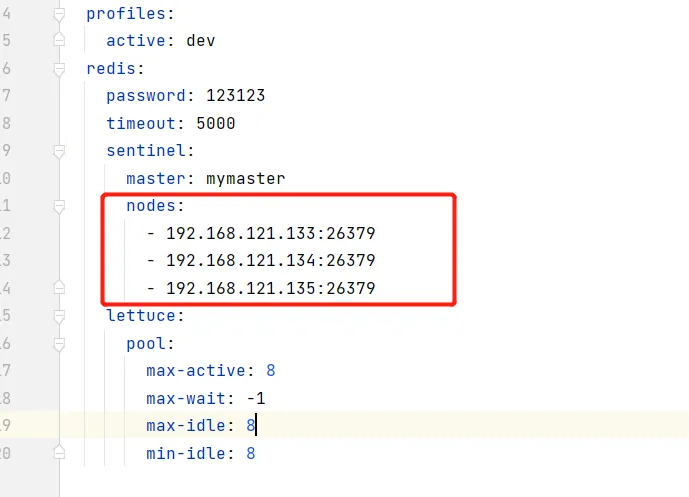
If there are many sentinel nodes, you can configure them one per line:
Sentinels judge node failure in two stages — subjective down and objective down. Only when enough sentinels agree the master is unavailable does an election vote start. During the election, the whole cluster cannot serve requests.
Subjective Down vs. Objective Down
SDOWN (subjectively down): the current sentinel instance, on its own, considers a Redis server to be unavailable.
ODOWN (objectively down): multiple sentinel instances all see the master as SDOWN, at which point the master enters ODOWN. Put simply, ODOWN means the cluster has collectively confirmed the master is "unavailable," and failover kicks off.
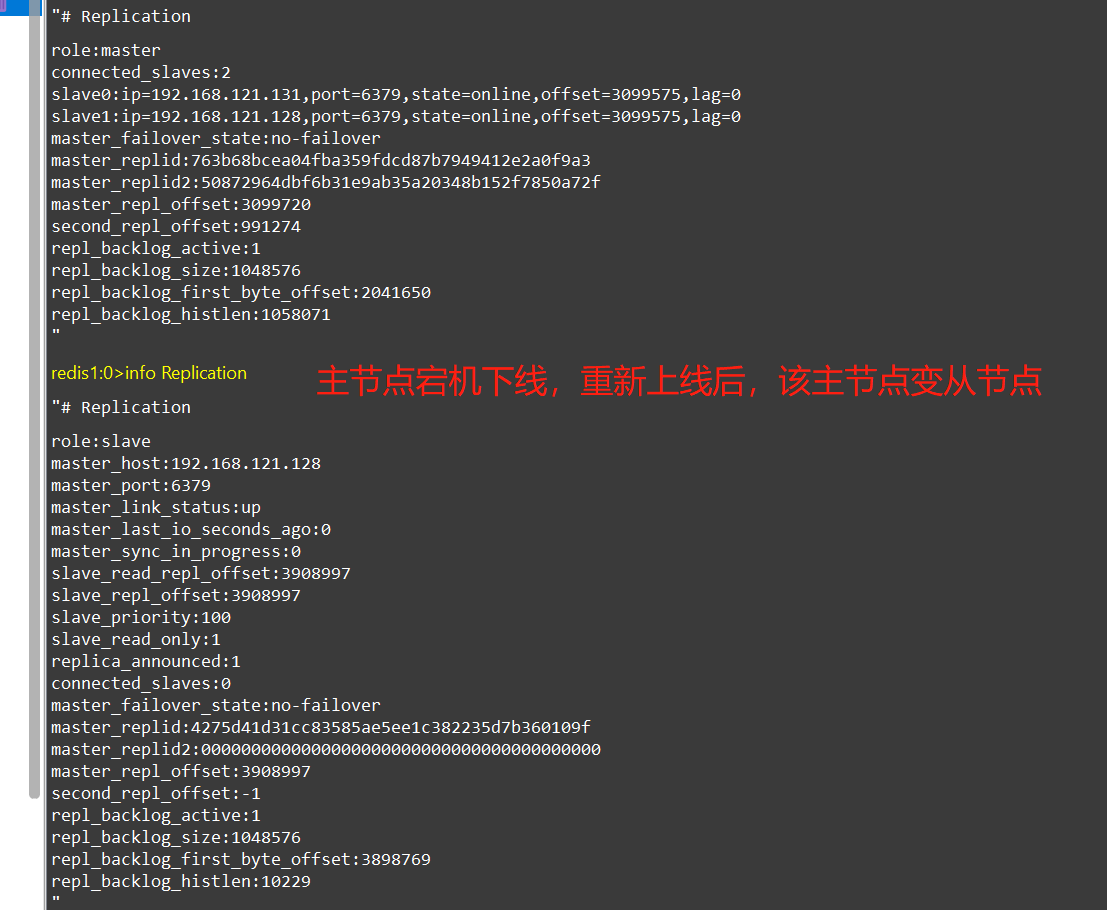
Cluster Mode
Official docs: Scale with Redis Cluster
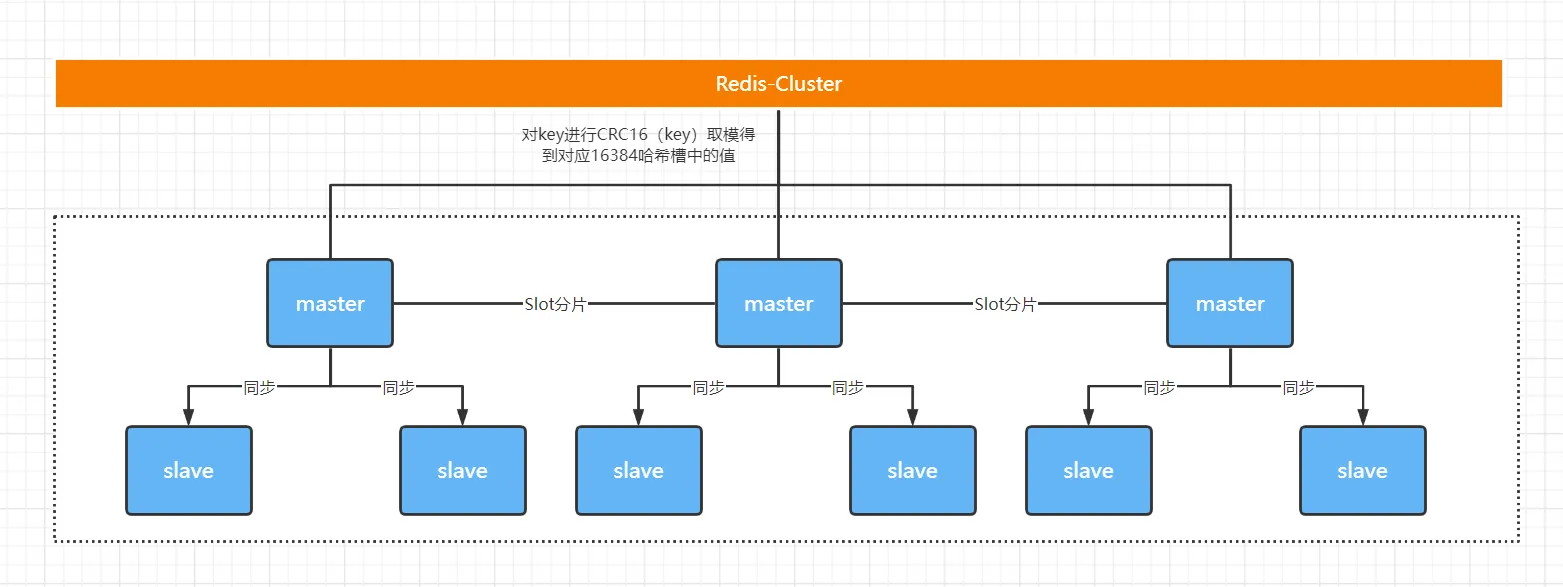
There are three common clustering solutions:
- Twemproxy (a Redis proxy open-sourced by Twitter)
- No friendly monitoring/management dashboard, which makes operations and monitoring painful.
- Its biggest pain point: no smooth scale-out/scale-in. Adding Redis instances for business growth means an enormous amount of operational work.
- Codis (built in-house at Wandoujia)
- Has a management UI.
- Handles dynamic node addition well.
- The official solution: Redis Cluster
Pros: Compared with Sentinel mode, Cluster mode drops the centralized design, implements load balancing automatically, and raises the storage ceiling as nodes are added. Nodes communicate over a lightweight protocol to reduce bandwidth usage, and dynamic node scaling is supported. The cluster maps keys to instances using hash slots: there are 16384 hash slots in total, distributed across all nodes by default, with each instance owning a contiguous range — essentially data partitioning. Each key is hashed with CRC16 and taken modulo 16384, i.e. CRC16(key) mod 16384, and the result determines which hash slot the key lives in.
In short, three wins: write capacity scales, storage capacity scales, and there's no central node.
Cons: Data storage skew and data access skew.
Data Skew
Data skew is when data is distributed unevenly across the instances of a sharded cluster — a large share of the data piles onto one or a few instances, storage pressure isn't spread evenly, and hot data keeps hitting the same fixed instances, driving up their load until they risk going down. There are three main causes.
- Bigkeys.
A bigkey has either a very large value (String type) or a huge number of collection elements (collection types). It inflates that instance's data volume and memory consumption. Worse, operations on a bigkey generally block the instance's IO thread, so if the bigkey gets heavy traffic, every other request on that instance slows down.
The fundamental way to avoid bigkey-induced skew is to avoid packing too much data into a single key-value pair when generating data at the business layer. If the bigkey happens to be a collection type, another option is to split it into many small collections spread across different instances.
- Uneven slot allocation.
If the cluster operators don't distribute the slots evenly, a large amount of data lands in the same slot — and since a slot lives on exactly one instance, that instance ends up hoarding data, causing skew.
Operational discipline can prevent assigning too many slots to one instance in the first place. For a cluster with slots already allocated, first inspect the slot-to-instance mapping to see whether too many slots have piled onto one instance; if so, migrate some slots to other instances to eliminate the skew.
How you check slot allocation depends on the cluster: for Redis Cluster, use the CLUSTER SLOTS command; for Codis, check the codis dashboard UI.
- Hash Tags.
A Hash Tag is a pair of curly braces {} inside a key. The braces enclose part of the key, and when the client computes the key's CRC16 value, it only hashes the content inside the braces.
Say the key is user:profile:3231 and we make 3231 the Hash Tag, turning the key into user:profile:{3231}. The client then computes the CRC16 of just 3231; without the tag, it would hash the entire "user:profile:3231".
The benefit of Hash Tags: keys that share the same tag content map to the same slot, and therefore land on the same instance.
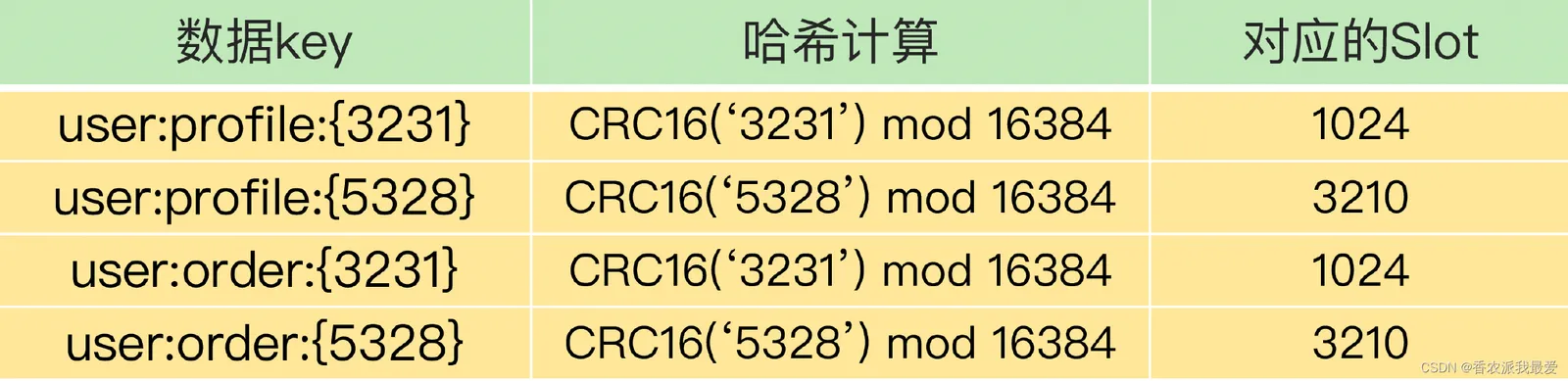
Where are Hash Tags typically used? Mainly in Redis Cluster and Codis, to support transactions and range queries. Neither Redis Cluster nor Codis supports cross-instance transactions or range queries natively, so when the application needs them, its only options are to pull the data up into the business layer for transaction handling, or to query each instance one by one and stitch together the range-query result.
With Hash Tags you can map the data involved in a transaction or range query onto the same instance, making both trivial to implement.
The catch is that Hash Tags can concentrate a lot of data onto one instance, causing skew and unbalanced load across the cluster. You have to weigh the need for range queries and transactions against the access pressure that skew brings.
My recommendation: if sharding by Hash Tag would create significant access pressure, prioritize avoiding data skew and skip Hash Tags altogether. Transactions and range queries can still be done client-side, whereas data skew destabilizes instances and can take the service down.
Data Access Skew: Causes and Remedies
The root cause of access skew is hot data on an instance (breaking-news content in a news app, hot items during an e-commerce promotion, and so on). Once hot data lands on an instance, that instance's request volume far exceeds the others', putting it under enormous pressure.
Hot data is usually just one or a few keys, so reassigning slots doesn't solve the problem. Hot data is typically read-heavy, and in that case the remedy is to keep multiple replicas of it.
Concretely: make several copies of the hot data, and prepend a random prefix to each copy's key so the copies don't map to the same slot. Now the hot data has multiple copies that can serve requests concurrently, and because their keys differ, they map to different slots. When assigning those slots to instances, take care to put them on different instances — and the access pressure gets spread out.
Note: the multi-replica approach only works for read-only hot data. If the hot data is both read and written, multi-replica doesn't fit, because keeping the replicas consistent adds overhead. For read-write hot data, you have to scale up the instance itself — e.g. a machine with a beefier spec — to absorb the traffic.
Cluster Usage Notes
Redis Cluster nodes periodically exchange Gossip messages and run heartbeat checks. The official recommendation is to keep a Redis Cluster under 1000 nodes; beyond that, the bandwidth consumption becomes non-trivial.
- Message frequency: when a node finds its last contact with another node exceeded cluster-node-timeout/2, it sends a PING immediately.
- Message size: the slots array (2kb) plus state data for 1/10 of the cluster (state for 10 nodes is about 1kb).
- Machine footprint: the more machines the cluster spans, and the more evenly nodes are spread across them, the more aggregate bandwidth the cluster has available.
Limitations of Redis Cluster:
Limited support for batch key operations: e.g. mget/mset keys must be in one slot
Limited support for key transactions and Lua: keys involved must be on one node
The key is the smallest unit of partitioning: a bigkey cannot be split across partitions
No multiple databases: cluster mode has only db0
Replication is single-level only: no tree-shaped replication topology
Redis Cluster delivers capacity and performance scalability that many workloads 'don't need'
Client performance usually 'degrades'
Commands cannot cross nodes: mget, keys, scan, flush, sinter, etc.
Lua and transactions cannot cross nodes
Client maintenance is more complex: SDK and application overhead (e.g. more connection pools)
For many scenarios, Redis Sentinel is already enough.
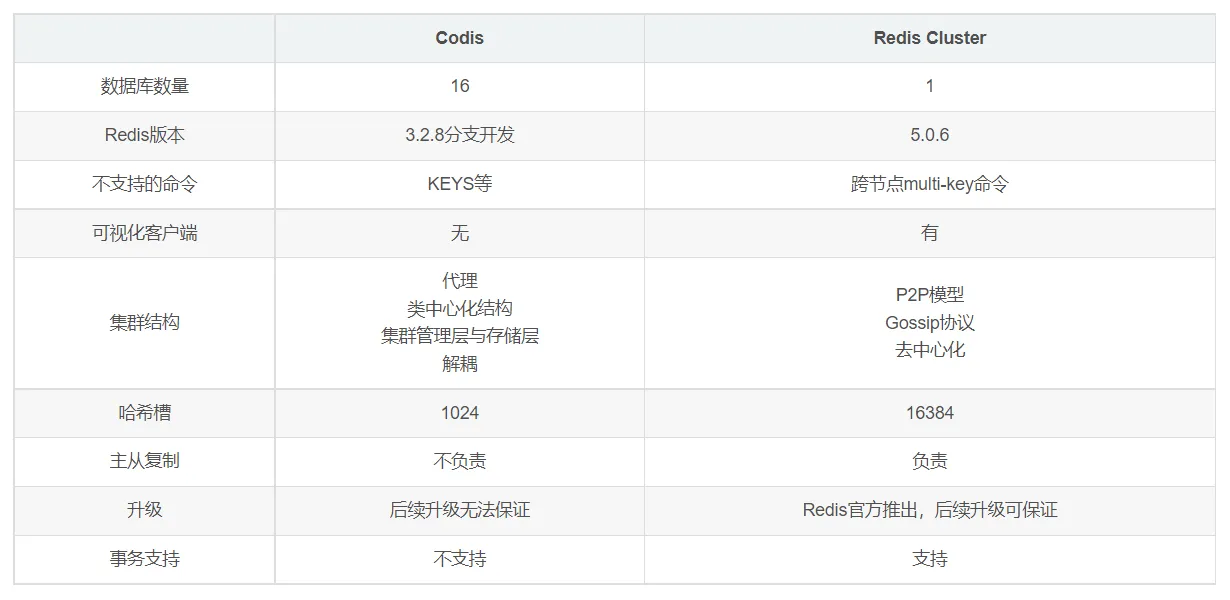
Codis vs. Redis Cluster:
Redis Cluster Summary
1. Redis Cluster partitions data using virtual slots (16384 of them); each node owns a portion of the slots and their data, balancing both data and requests
2. Building a Redis Cluster has four steps: prepare the nodes, the meet operation, assign the slots, replicate the data
3. Redis officially recommends the redis-trib.rb tool for quick setup (redis-trib before Redis 5.0; redis-cli from 5.0 on)
4. Cluster scaling works by moving slots and their data between nodes: on scale-out, slots migrate from source nodes to new nodes per a migration plan; on scale-in, any slots owned by a departing node migrate to other nodes first, then cluster forget makes every node in the cluster forget the removed node
5. Use a smart client for maximum communication efficiency: the client internally computes and maintains the key-slot-node mapping to locate the target node quickly
6. Automatic failover splits into failure detection and node recovery. Node failure has subjective-down and objective-down stages; once more than half the nodes see a failed node as subjectively down, it is marked objectively down. A replica then triggers the failover process for the objectively-down master, preserving cluster availability
7. Common development and operations issues include: bandwidth consumption in very large clusters, pub/sub broadcast issues, cluster skew, and single-instance vs. cluster trade-offs
Building a Redis Cluster with redis-cli (version 7.0.4)
At least 6 nodes: (1 master + 1 replica) × 3 = 6 nodes. Before Redis 5.0, use the redis-trib tool; from 5.0 on, use the redis-cli command.
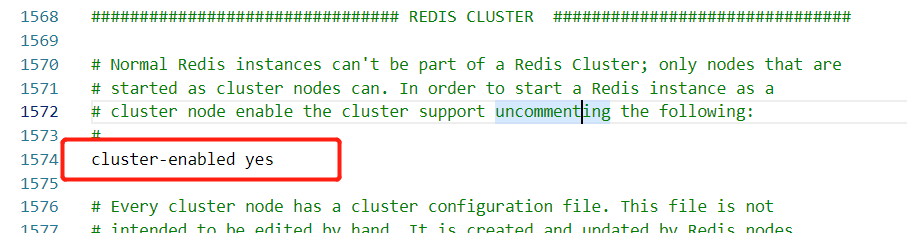
- Set up redis.conf. Use the same password on all nodes, then enable cluster mode (see the official docs for more configuration details):
# Enable cluster mode
cluster-enabled yes
- Run the cluster creation command:
redis-cli --cluster create --cluster-replicas 1 192.168.121.145:6379 192.168.121.143:6379 192.168.121.142:6379 192.168.121.141:6379 192.168.121.144:6379 192.168.121.140:6379 -a 【密码】
Here redis-cli --cluster (or ./redis-trib.rb) is the cluster operations command; create means create a cluster; --replicas 1 (or --cluster-replicas 1) sets one replica per master, so total nodes ÷ (replicas + 1) gives the number of masters. The first n nodes in the list therefore become masters, and the rest become replicas, randomly assigned to different masters.
After running the command you'll be prompted to confirm the cluster's slot allocation. You must type the full word yes, not just y — otherwise automatic slot allocation is skipped and the cluster is unusable. If slots go unallocated, run redis-cli --cluster fix 127.0.0.1:6379 -a 【密码】 (against any node) to repair them.
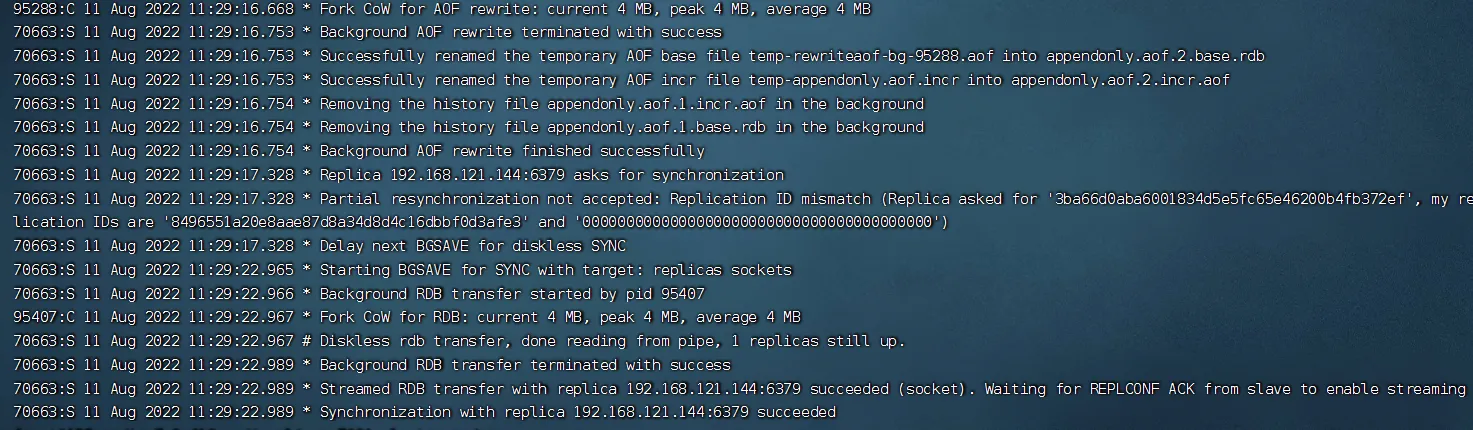
The log output shows the cluster was created automatically.
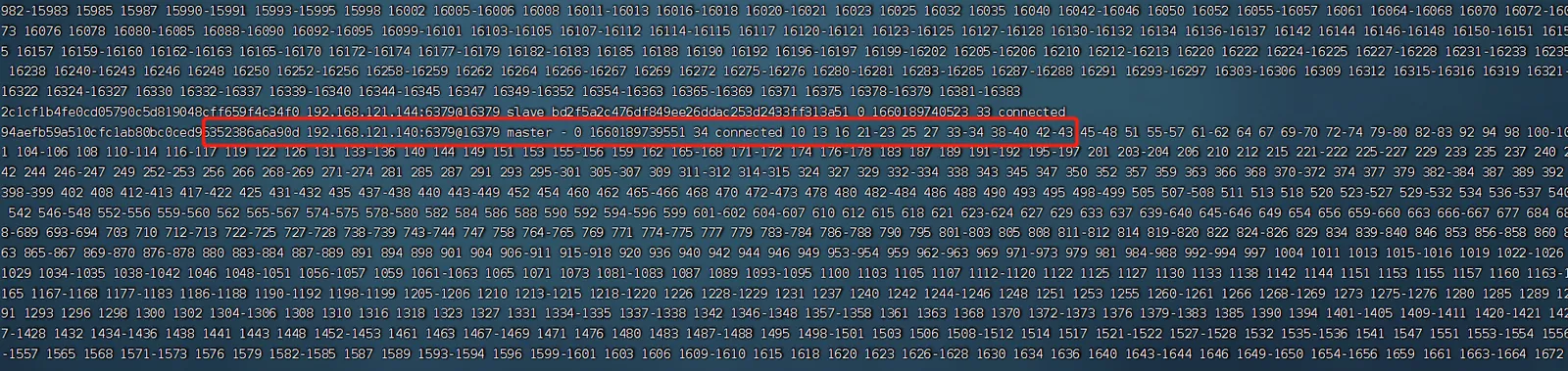
- Check the current cluster node info:
redis-cli -h 【任意节点ip】 -p 【端口】 -a 【密码】 cluster nodes
Node info below (slots not yet allocated at this point):

After slot allocation (you can see the slot ranges each master owns):
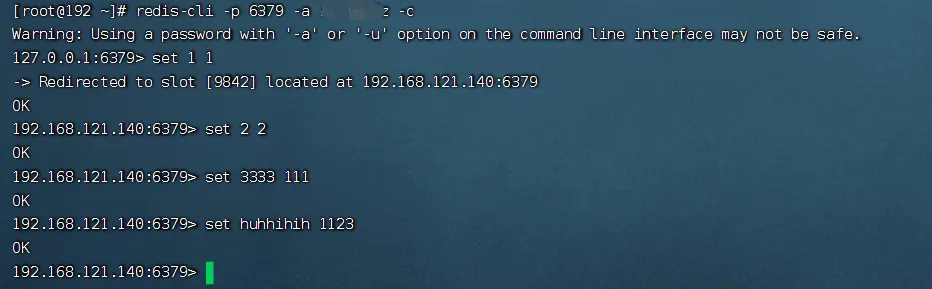
Trying an insert:
Checking with a UI tool that the value was stored — connecting to any cluster node works:
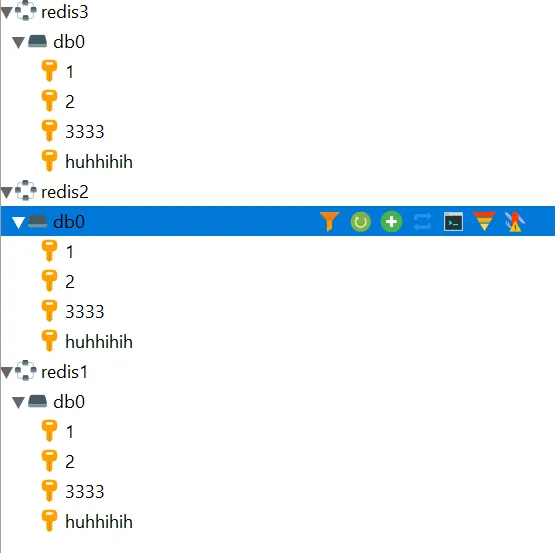
The Redis cluster is up and running.
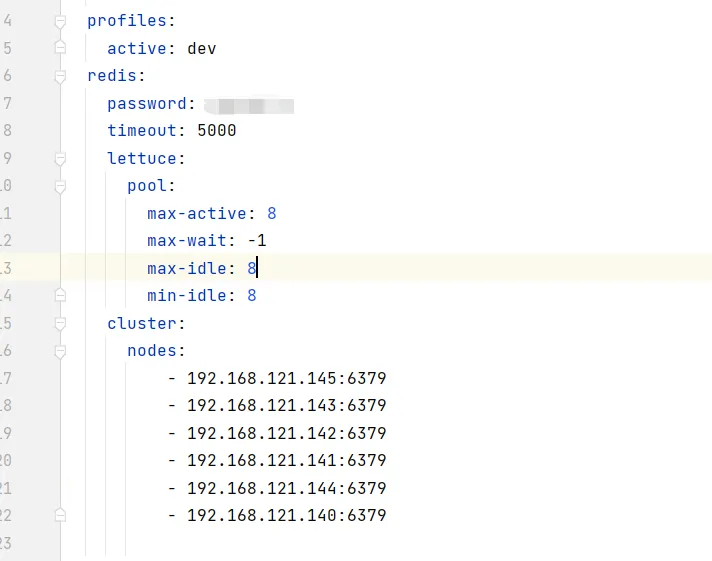
Connecting to the cluster from spring-boot:
Wrapping Up
Replication is the simplest to configure, but losing the master means losing writes — it mostly serves as the foundation for the other modes. Sentinel adds automatic failover on top of replication, and for many workloads that's already enough. Cluster mode brings horizontal scaling of both writes and storage, but introduces new problems like data skew and restricted cross-node commands. When choosing, size up your data volume and write pressure first — there's no need to jump straight to a full cluster.
COMMENTS