Deploying Istio on Kubernetes
Kubernetes has already solved most operational problems, with excellent built-in automation: dynamic scaling, scheduling, image management, restarting crashed containers, monitoring compute nodes, and so on. But k8s doesn't provide application-layer monitoring and traffic management, coordination between services calling each other, a service registry, or a configuration center. That gap is where Istio, the flagship product of the Service Mesh architecture, comes in.
Istio is a framework jointly developed by Google, IBM, and Lyft. Its main job is to control, connect, secure, configure, and observe traffic between microservices in a k8s environment, letting us ditch the cumbersome, complex, hard-to-maintain, tightly coupled low-level microservice SDKs when building microservices.
Istio Architecture
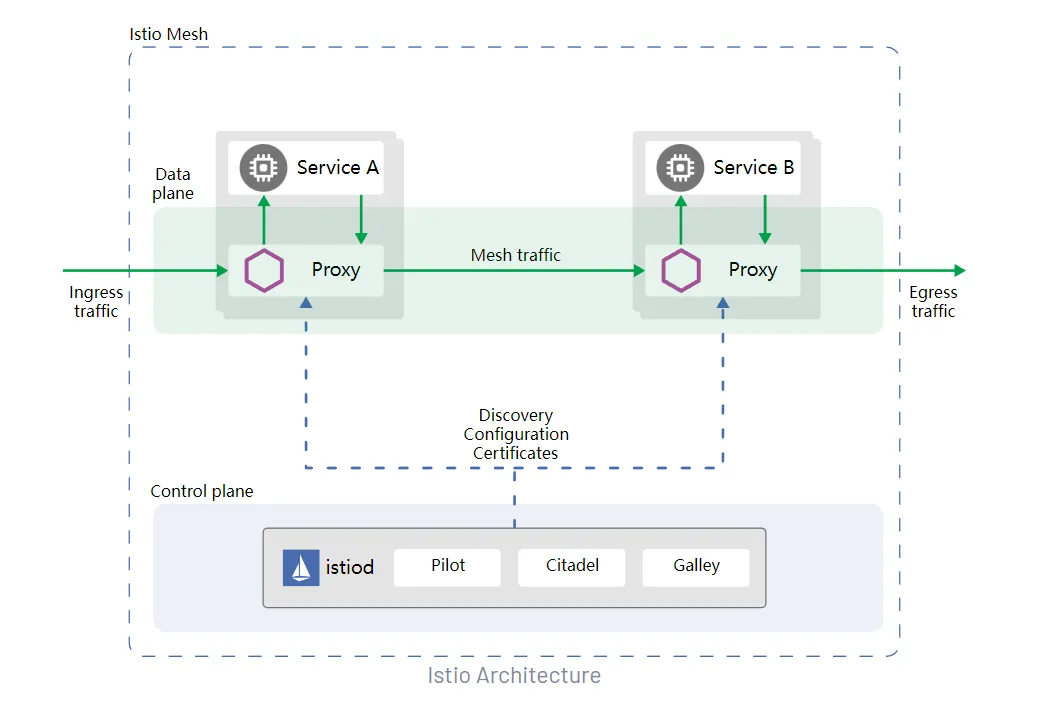
Architecturally, Istio is split into a data plane and a control plane.
The core idea of the data plane is the Sidecar pattern: a proxy container is added to the same pod to take over the traffic of our business container, delivering all kinds of functionality without any intrusion into the business code. Examples include load balancing, traffic encryption, monitoring, policies (canary releases, blue-green deployments), circuit breaking, degradation, remote service calls, configuration center, service registry, and other common microservice features (it does not handle distributed transaction management, which arguably isn't something Istio should take over anyway).
The control plane is responsible for managing and configuring the proxies to route traffic. It also configures Mixer to enforce policies and collect telemetry data for display, providing features like call-chain analysis and service topology graphs.
Since business code no longer depends on a specific microservice SDK — tightly coupled frameworks like SpringCloud, Dubbo, Motan, or ServiceComb — we can pick the right language for each business scenario and let teams working in different languages build features side by side, improving overall efficiency while handing all the fiddly registration, configuration, and remote-call management over to Istio.
Component Overview
citadel: the core security component, responsible for identity authentication and certificate management.
galley: the configuration management component — it validates the format and content of configuration files and feeds that configuration to pilot and mixer.
pilot: the control hub, covering service discovery plus rule translation and distribution.
proxy: implemented by Envoy (written in C++) together with Pilot-agent, providing dynamic service discovery, load balancing, TLS, circuit breaking, health checks, traffic splitting, canary releases, and more. It also generates telemetry data, giving microservices observability.
Ingressgateway: the gateway at the entry point — traffic from outside the mesh reaches services inside the mesh through this gateway.
Full official documentation: Istio / Docs
Deployment Steps
I'm going with the simplest option here: installing with Helm.
1) Why Helm
Helm plays the role of a package manager for a K8S cluster. Declaring K8S resources — Services, Pods, Ingresses — means writing Yaml files. As microservices multiply, and you add Redis clusters, MySQL HA clusters, Hadoop clusters, and so on, the pile of Yaml files keeps growing, along with the risk of mistakes. More importantly, if the business grows and you deploy K8S clusters in other regions, a multi-region active-active setup means deploying yet another batch of Pods. This is exactly the kind of problem Helm solves: a Helm Chart bundles all the Yaml configuration a complete service needs.
Helm's advantages:
- Efficient reuse of yaml files.
- Managing a large number of yaml files as a single unit.
- Application-level version management.
Later on, you can also set up an internal Chart repository for your company. Whenever a service is needed, instead of writing Yaml files by hand, you simply run the Chart through Helm and the corresponding Pods are deployed to the K8S cluster, giving you the service ready to go.
2) Installing Helm
Helm needs to be installed first (official site): Helm | Docs (helm.sh)
When installing, mind the version compatibility between Helm and Kubernetes: Helm | Helm Version Support Policy
3) Installing Istio
Let's run the installation: Istio / Install with Helm
Create the istio-system namespace for the Istio components:
$ kubectl create namespace istio-system
Install the Istio base chart, which contains the cluster-wide resources used by the Istio control plane:
# The official docs don't list the chart repository, so I've added it here
$ helm repo add istio https://istio-release.storage.googleapis.com/charts
$ helm install istio-base istio/base -n istio-system
Install the Istio discovery chart, which deploys the istiod service:
$ helm install istiod istio/istiod -n istio-system --wait
(Optional) Install Istio's ingress gateway:
The Linux kernel must be 4.11 or later — check your kernel version to make sure it qualifies.
# Create the namespace for the ingress gateway and enable automatic sidecar injection
$ kubectl create namespace istio-ingress
$ kubectl label namespace istio-ingress istio-injection=enabled
$ helm install istio-ingress istio/gateway -n istio-ingress --wait
With the Istio ingress in place, you can deploy Istio's official demo project, the Bookinfo microservices, to try out Istio's various capabilities.
Bookinfo
Official page: Istio / Bookinfo Application

The Bookinfo microservices are deployed with Istio sidecars and are written in 4 different languages. The Reviews service, written in Java, ships in 3 different versions, which makes it a great showcase of Istio's capabilities in multi-version control, traffic management, migration, and integration.
Wrapping Up
Istio pulls service governance out of the business code: the data plane takes over traffic with Sidecars, the control plane distributes routes and policies centrally, and applications are no longer tied to any language-specific microservice SDK. On the deployment side, with Helm, three install commands get you base, istiod, and the ingress gateway — far less work than hand-writing a pile of Yaml. Once installed, running through the official Bookinfo example gives you a solid feel for multi-language, multi-version traffic management. From there, you can gradually adopt capabilities like canary releases and circuit breaking in your own systems.
COMMENTS