JUC Review (Part 1): Thread Fundamentals
The JUC chapter of Java covers a huge number of topics. To better organize what I know, I'm writing it up as blog posts, working through it from the underlying principles and distilling my own understanding of concurrent programming.
What Is Concurrent Programming
The reason traces back to the history of computing. Per Moore's law, CPU compute power kept climbing over time, but Moore's law soon approached its physical limits and single-core CPU performance hit a wall. In pursuit of more compute, the industry turned to multi-core CPU architectures; multiple cores plus hyper-threading dramatically increased CPU throughput. The principle is like having several people execute different instructions at the same time — overall efficiency naturally beats one person working alone. (Note that this means higher overall efficiency; using multiple threads does not guarantee an application executes instructions faster than a single-threaded one.)
To make better use of multi-core CPU resources (squeezing everything out of the CPU), multithreaded programming was born. While multithreading does improve overall program efficiency in some scenarios, it is not a silver bullet: it brings along thread safety, locking, deadlocks, thread context-switching overhead, and a whole series of other problems.
After all this talk about threads — what exactly is a thread?
A thread is the smallest unit of execution that the operating system can schedule. It lives inside a process and is the actual working unit within it. A thread is a single sequential flow of control within a process; one process can run multiple threads concurrently, each executing a different task in parallel, and every process has at least one running thread.
Where Threads Live in the JVM
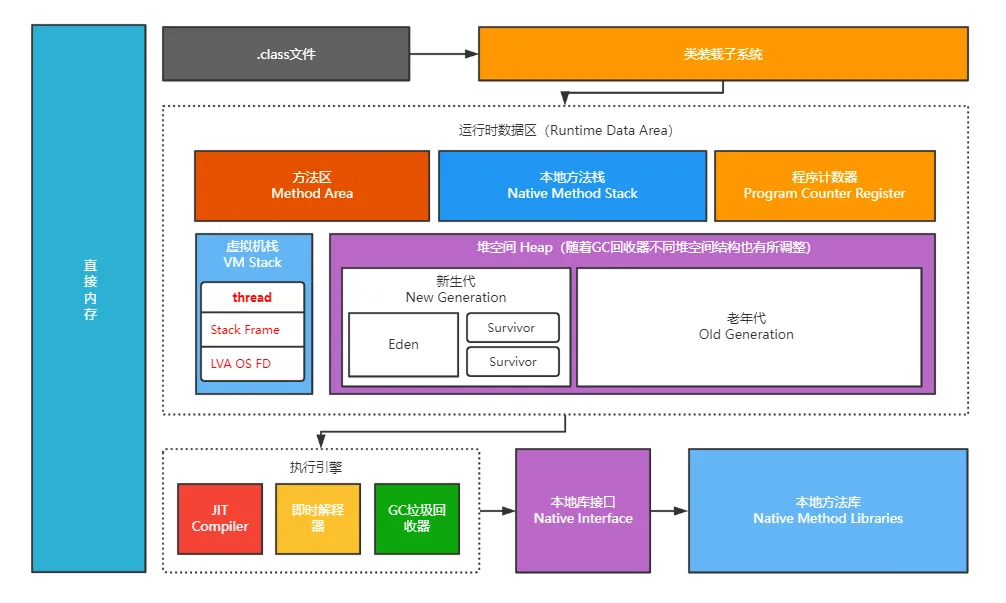
From the JVM memory model diagram, we can see exactly where a Thread sits within the JVM. In the VM Stack space, every thread has its own thread stack, which holds many Stack Frames; each frame in turn holds the LVA, OS, FD, and other data.
LVA: Local Variable Array
- The local variable section of a stack frame is a byte array indexed from 0.
- It contains all the method parameters and local variables.
- Each slot or entry in the array is 4 bytes.
- int, float, and reference types each occupy one entry (slot) in the array, i.e. 4 bytes.
- double and long values occupy 2 consecutive entries, i.e. 8 bytes total.
- byte, short, and char are converted to int before being stored and take 1 slot, i.e. 4 bytes.
- How boolean values are stored varies across JVM implementations. In most JVMs, a boolean occupies one slot in the local variable array.
- Parameters are placed into the local variable array first, in the order they are declared in the method.
OS: Operand Stack
- The JVM uses the operand stack as its working space at runtime — a place to store intermediate results of computations.
- Like the local variable array, the operand stack is organized as an array. But it isn't accessed by index; instead, instructions access it by pushing values onto the stack or popping them off to perform whatever operations we need.
FD: Frame Data
- The frame data area contains all the symbolic references (constant pool resolution) and the return address for normal methods; that return address is tied to a specific method and used to jump back.
- It also holds a reference to the exception table, which provides the catch-block information when an exception occurs.
In JDK 1.8, the default thread stack size is 1MB; it can be adjusted via -XX:ThreadStackSize=256k. If the thread stack runs out of space, a StackOverflowError is thrown.
The Thread Stack
Thread stack: every time a thread executes a function, a stack frame is pushed. The thread stack is first-in, last-out — the earliest frame sits at the bottom, the latest at the top, and execution proceeds from the top downward. For example, if function A calls B, and B calls C, the stack looks like this:

The stack structure is simple and needs no garbage collector, because a frame's memory is destroyed the moment it finishes executing.
Threading Models
One-to-One Model (one LWP maps to one KLT)
This is the model used in JDK 1.8.
KLT: Kernel Level Thread. In this implementation, thread support, thread switching, and scheduling are handled directly by the operating system kernel — threads are mapped onto the processors.
LWP: Light Weight Process. Programs generally don't use kernel threads directly; instead they schedule and operate kernel threads through a higher-level interface, the LWP. An LWP differs from an ordinary process in that it carries only a minimal execution context plus the statistics the scheduler needs — which is why it's called lightweight — and its relationship with a KLT is strictly 1:1.
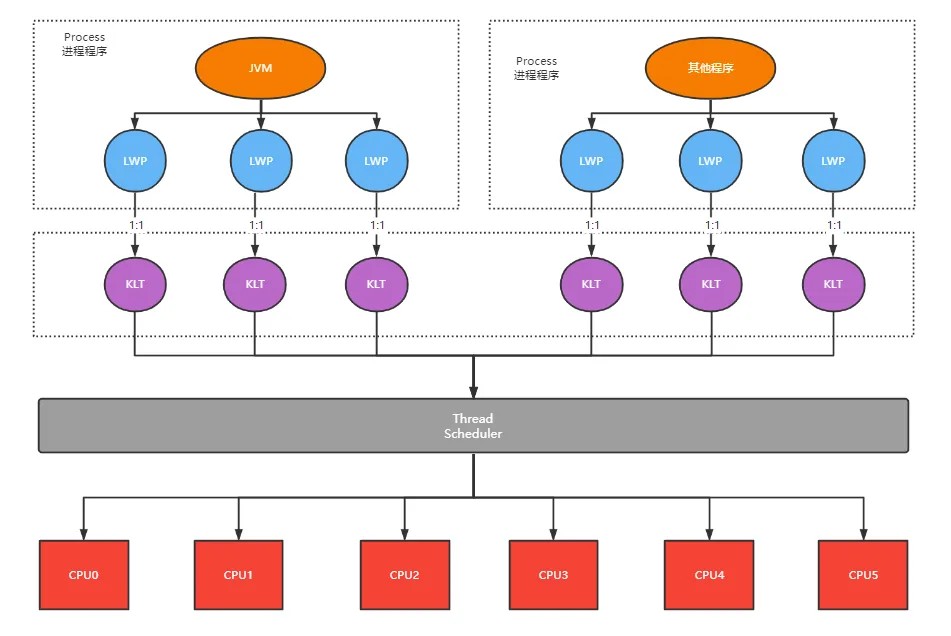
Pros:
- Simple to implement and suitable for most multithreading scenarios; all mainstream JVMs use this approach today.
Cons:
-
Blocking and waking a user thread maps directly onto the kernel thread, and as the thread count grows, frequent switching between threads drives up CPU overhead. JDK 1.8 introduced the CAS algorithm to avoid frequent thread switching and locking, which did substantially improve the JVM's concurrency performance.
-
The kernel can only create a limited number of threads. If an application creates too many, system performance drops sharply, with most CPU time slices burned on switching between the excess threads.
Many-to-Many Model (virtual user threads, UT, built on top of LWPs)
This is the model used by the Go language and by JDK 19.
UT: User Thread. Built in user space, invisible to the system kernel, with low costs for creation, destruction, and switching.
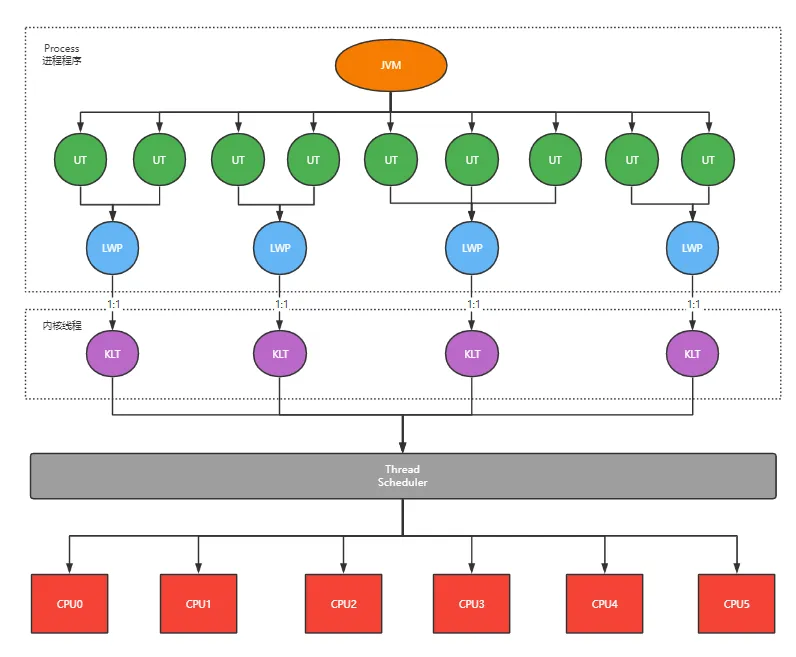
The many-to-many model, also called the two-level threading model, absorbs the strengths of the other models while dodging their weaknesses as much as possible. Under this model, user threads and kernel threads have a many-to-many (M : N, usually M >= N) mapping.
Pros:
-
The application manages the switching between UTs itself, so the underlying CPU doesn't have to switch threads as often and can run the current thread more continuously, improving program efficiency.
-
UT scheduling priority can be controlled by the program itself.
-
Massively higher concurrency — with this model you can spin up tens of thousands of UTs and still serve traffic well, making it a natural fit for high-concurrency scenarios.
Cons:
- It's fairly complex to implement. Go's GMP threading model is a many-to-many implementation of exactly this kind, and it's one of the reasons goroutines can deliver such high concurrency. Java's Project Loom has been exploring the same territory and landed in JDK 19 — feel free to give it a try. JEP 425: Virtual Threads (Preview) (openjdk.org)
The Five Thread States
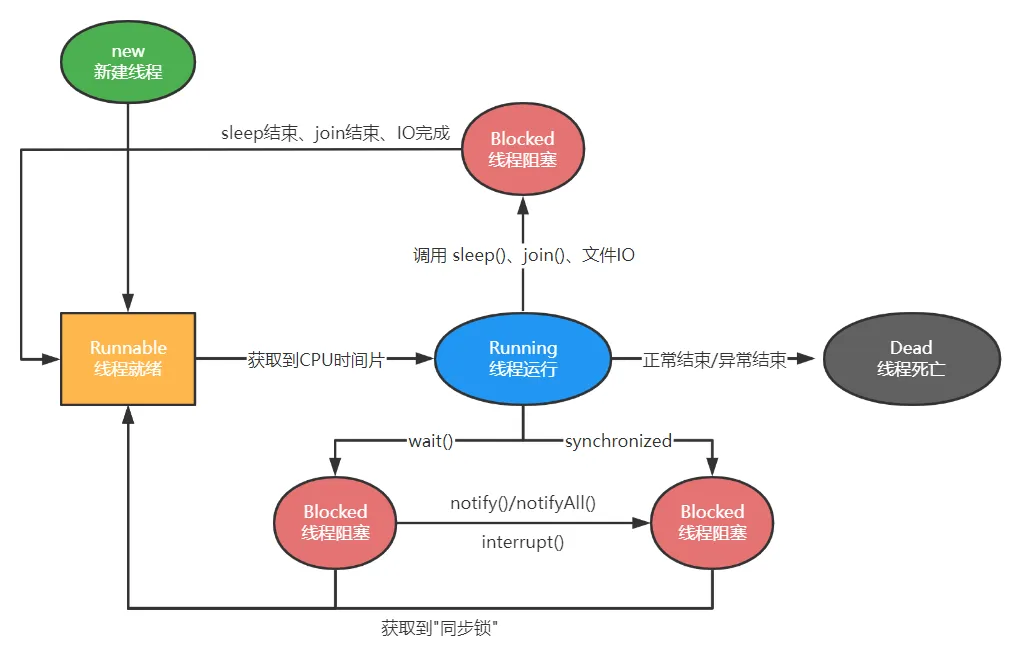
1) New
Once a thread object is created, it enters the New state.
2) Runnable
Also called the "ready-to-run" state. After the thread object is created, another thread calls its start() method — e.g. thread.start() — to launch it. A thread in the Runnable state may be scheduled onto the CPU at any moment, but exactly when it runs is up to the CPU.
3) Running
The thread has acquired CPU time and is executing. Note that a thread can only enter the Running state from the Runnable state.
4) Blocked
- (01) Wait blocking — calling the thread's wait() method makes it wait for some work to complete. The thread can be woken via notify(), after which it returns to the Runnable state.
- (02) Synchronization blocking — when a thread fails to acquire a synchronized lock (because another thread holds it), it enters the synchronization-blocked state.
- (03) Other blocking — calling sleep() or join(), or issuing an I/O request, puts the thread into a blocked state. When sleep() times out, join() sees the target thread terminate or times out, or the I/O completes, the thread returns to the Runnable state.
5) Dead
The thread has finished executing or exited the run() method due to an exception, ending its life cycle.
Thread Pools in Java
From the thread states above, it's clear that constantly creating and destroying threads burns extra compute in the New and Dead states. To use threads more effectively, thread pools were introduced to manage thread resources. A pool creates a set number of threads up front; when work arrives, a thread is taken from the pool to run it, and once the task completes the thread is tossed back into the pool. This neatly avoids the repeated create-and-destroy cycle and improves program efficiency.
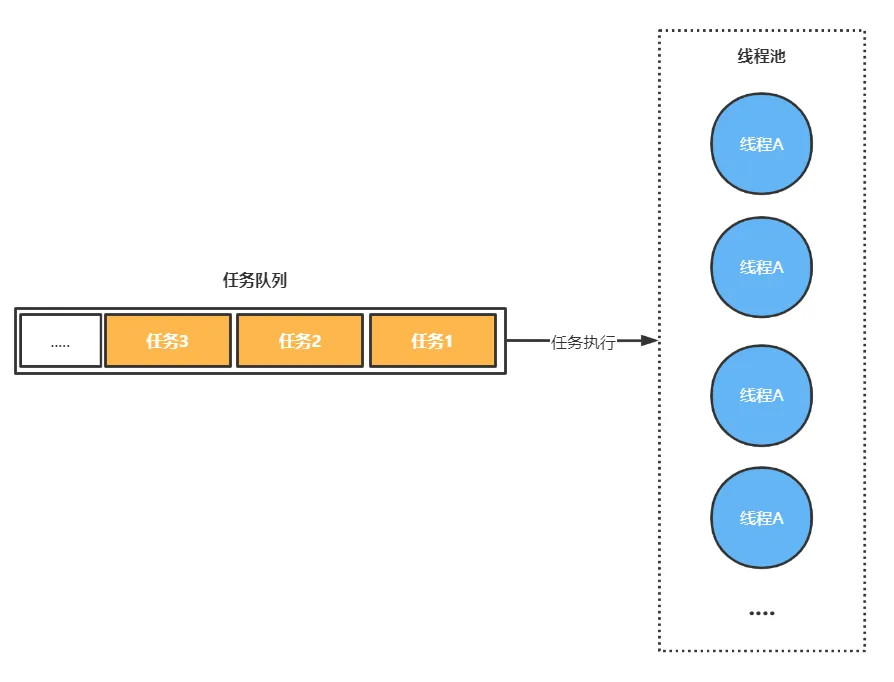
Advantages:
-
Better control over the number of threads and tasks in the application.
-
Faster task execution — shorter request response times (no creation and destruction steps).
-
Parallel computation across multiple threads for higher efficiency, plus other enhanced features.
-
Thread reuse, lowering the system's compute resource overhead.
Ways to Create a Thread Pool
- Manually, via ThreadPoolExecutor.
- Automatically, via the Executors factory.
7 Ways to Create a Thread Pool
- Executors.newFixedThreadPool: creates a fixed-size pool that caps the number of concurrent threads; excess tasks wait in the queue.
- Executors.newCachedThreadPool: creates a cached pool — threads beyond what's needed are reclaimed after being idle for a while, and new threads are created when there aren't enough.
- Executors.newSingleThreadExecutor: creates a single-thread pool that guarantees first-in, first-out execution order.
- Executors.newScheduledThreadPool: creates a pool that can run delayed tasks.
- Executors.newSingleThreadScheduledExecutor: creates a single-threaded pool that can run delayed tasks.
- Executors.newWorkStealingPool: creates a work-stealing pool (task execution order is nondeterministic).
- ThreadPoolExecutor: the manual approach, which takes up to 7 parameters at construction: core pool size, maximum pool size, blocking queue type (bounded or unbounded), keep-alive time, time unit, thread factory, and rejection policy.
int corePoolSize,                    // core thread count
int maximumPoolSize,                 // maximum thread count
long keepAliveTime,                  // idle keep-alive time for non-core threads
TimeUnit unit,                       // unit for the keep-alive time
BlockingQueue<Runnable> workQueue,   // blocking queue (bounded / unbounded)
ThreadFactory threadFactory,         // thread factory
RejectedExecutionHandler handler     // rejection policy
The recommended way to create a thread pool is the last one, ThreadPoolExecutor, because it makes the pool's operating rules explicit and avoids the risk of resource exhaustion.
Rejection Policies
There are 4 rejection policies:
- ThreadPoolExecutor.AbortPolicy: the default — rejects the task and throws an exception.
- ThreadPoolExecutor.CallerRunsPolicy: runs the task directly on the calling thread.
- ThreadPoolExecutor.DiscardPolicy: silently rejects the task without throwing.
- ThreadPoolExecutor.DiscardOldestPolicy: once rejection kicks in, for every new task that arrives, keeps discarding the oldest task in the blocking queue and enqueues the new one.
Maximum tasks a pool can hold = thread count + queue length.
If a pool has a maximum of 10 threads and a queue length of 20, it can accept at most 30 tasks at once; anything beyond that hits the configured rejection policy. You can also implement the RejectedExecutionHandler interface yourself to customize the rejection flow.
Wrapping Up
Starting from the JVM memory model, this post walked through the internal structure of the thread stack, the trade-offs between the one-to-one and many-to-many threading models, and the five thread states. Once you understand the cost of creating and destroying threads, the reason thread pools exist becomes obvious. In practice, create pools manually with ThreadPoolExecutor, making the core parameters and rejection policy explicit, to avoid the resource risks of the Executors defaults. These fundamentals are the prerequisite for understanding locks and the various JUC synchronizers in the posts to come.
COMMENTS