Setting Up a Zookeeper Cluster
This post walks through the full process of building a 5-node Zookeeper cluster on Debian — first covering the fundamentals like Znodes and the ZAB protocol, then getting hands-on with configuration and running a Leader failure election experiment.
Deployment environment
OS: Debian 11.5.0
Runtime: OpenJDK-1.8.0_332 64-Bit Server VM
Zookeeper version: 3.8.0
Official overview
Official Zookeeper documentation (the downloaded zip also ships docs in its \docs directory): ZooKeeper: Because Coordinating Distributed Systems is a Zoo (apache.org)
ZooKeeper is a distributed, open-source coordination service for distributed applications. It exposes a simple set of primitives that distributed applications can build upon to implement higher-level services for synchronization, configuration maintenance, and groups and naming. It is designed to be easy to program against, and uses a data model organized like a familiar filesystem directory tree. It runs in Java and has bindings for both Java and C.
The ZooKeeper implementation puts a premium on high performance, high availability, and strictly ordered access. High performance means it can be used in large distributed systems; reliability keeps it from becoming a single point of failure; and strict ordering means sophisticated synchronization primitives can be implemented at the client.
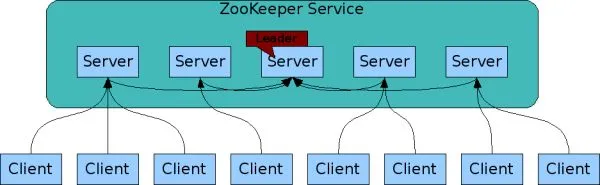
From the official description we can conclude that Zookeeper is mainly used for meta-information storage and configuration synchronization — a high-performance, highly available service with no single point of failure.
My take
The name literally means the keeper of a zoo. Most Apache projects use animals for their logos and names, which is why the Zookeeper logo looks like a caretaker holding a shovel (doge). Zookeeper's own architecture is quite simple and easy to pick up.

Apache Zookeeper is also a member of the broader Apache Hadoop architecture, where it serves as middleware for unified configuration management, naming services, and storage of critical data. In one sentence: Zookeeper = filesystem + notification mechanism.
Zookeeper (ZK from here on) stores data in something like a Key-Value form, except that in ZK data is stored as Znodes, managed much like the filesystem in Linux: every key is expressed as a file path, with multiple levels of directories. This resembles keys in Redis, except that Redis keys are conventionally namespaced with the : character, while ZK uses the Linux / separator throughout. ZK keeps its data in memory and persists it to disk, maintaining the tree-shaped Znode data structure (the filesystem) in memory.
Data structure

ZK values don't come with rich data structures (unlike Redis, which offers list, set, hashmap, zset, string, and more) — a ZK value is only ever a String. ZK was never meant to be a database; it was designed to store the critical configuration of an architecture and provide notification and synchronization on top, which is why each Znode can store at most 1M of data.
Znode types
1) Persistent nodes
Once created, a persistent node exists until someone explicitly runs a Delete command on it.
2) Ephemeral nodes
An ephemeral node is tied to the session of the client that created it: as long as the client stays connected, the node exists; once the client disconnects, the node is removed. See where this is going? It's a perfect fit for a service registry — Dubbo connects on startup, and when it goes down its Znode is deleted and the other clients are notified.
3) Sequential nodes
When you create a sequential node, a 10-digit counter is automatically appended to the node path.
For example, if I create the sequential node /node, the file path becomes: /node0000000001.
Create /node again and the counter increments by 1, creating a new Znode (the old /node0000000001 is not deleted — it stays), so the file path is now: /node0000000002.
However, once the counter exceeds 2147483647, it overflows.
4) Ephemeral sequential nodes
The properties of ephemeral nodes + the properties of sequential nodes.
ZK guarantees
- Sequential consistency — updates from a client are applied in the order they were sent.
- Atomicity — updates either succeed or fail. No partial results.
- Single system image — (globally consistent data) every server in the cluster holds the same copy of the data, so a client sees the same data no matter which server it connects to. [In theory it's consistent, though during data synchronization there can be moments of inconsistency — this can be resolved with the sync command.]
- Reliability — once an update has been applied, it persists from that point on until a client overwrites it.
- Timeliness — the client's view of the system is guaranteed to be up to date within a certain time bound.
Atomicity here is guaranteed by the ZAB protocol — short for Zookeeper Atomic Broadcast.
The ZAB protocol
ZAB has two modes: message broadcast mode and crash recovery mode.
Message broadcast mode
In a Zookeeper cluster, data replicas are propagated using message broadcast. ZK's replica synchronization resembles 2PC but is not the same: 2PC requires the coordinator to wait for ACK confirmations from every participant before sending the commit message, demanding that all participants either all succeed or all fail — which makes 2PC prone to severe blocking.
In Zookeeper, by contrast, the Leader waiting for Follower ACKs only means waiting for a majority of Followers to respond successfully — it doesn't need every Follower's reply — which cuts down the waiting time.
Crash recovery mode
Once the Leader server crashes, or network issues cause it to lose contact with a majority of Followers, the cluster enters crash recovery mode and elects a new Leader.
Building the cluster (5 nodes)
A ZK cluster needs at least 3 nodes, and the node count should be odd. The number of node failures it can tolerate is node count / 2: a 3-node cluster can keep serving with 1 node down, a 5-node cluster with 2 down. The rule is: as long as a majority of nodes are healthy, the cluster keeps serving requests.
The three roles in a ZK cluster
Leader: only one node in the entire cluster is elected Leader, and only the Leader can perform writes. (This design inherently makes ZK's write throughput a bottleneck, but since most operations happen in memory and each Znode holds very little data, write performance stays reasonably high.)
Follower: a cluster can have many Followers. They maintain heartbeat connections with the Leader, can only read, not write, and take part in electing a new Leader when the current one goes down.
Observer: the Observer sits at the very edge of the cluster — it can only read and cannot participate in Leader elections. Why does this role exist? Because a write in a ZK cluster only succeeds after a majority of Followers confirm the sync, so the more nodes in the cluster, the lower the write performance. Observers were designed to scale the cluster's read capacity without hurting write performance: they only replicate data from the Leader and serve reads.
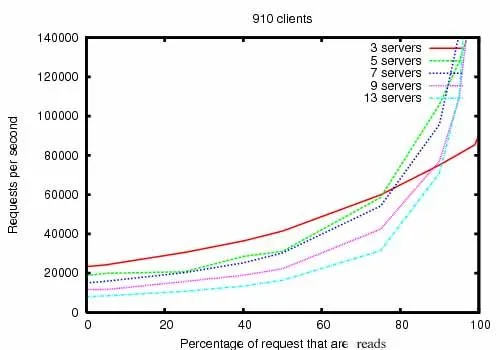
The official performance chart for ZK clusters of different sizes shows request throughput rising as the node count grows. To be precise, though, I'd say it's read capacity that rises while write capacity drops: with more nodes, a Leader write has to be synced to other Followers via the ZAB protocol, and only counts as successful once a majority of Followers have replicated it — so more nodes inevitably means lower write throughput. This design also shows that ZK isn't suited to write-heavy workloads; the officially recommended read/write ratio is around 7:3 or 8:2.
Configuring zoo.cfg (download and extraction skipped here)
After extracting the zip, go into the conf folder and rename zoo_sample.cfg to zoo.cfg, or copy it out as zoo.cfg.
Adjust some of the defaults in zoo.cfg — the most important change is the dataDir path. ZK defaults to a tmp path, but Linux periodically wipes that temporary directory, so we need to move it somewhere else.
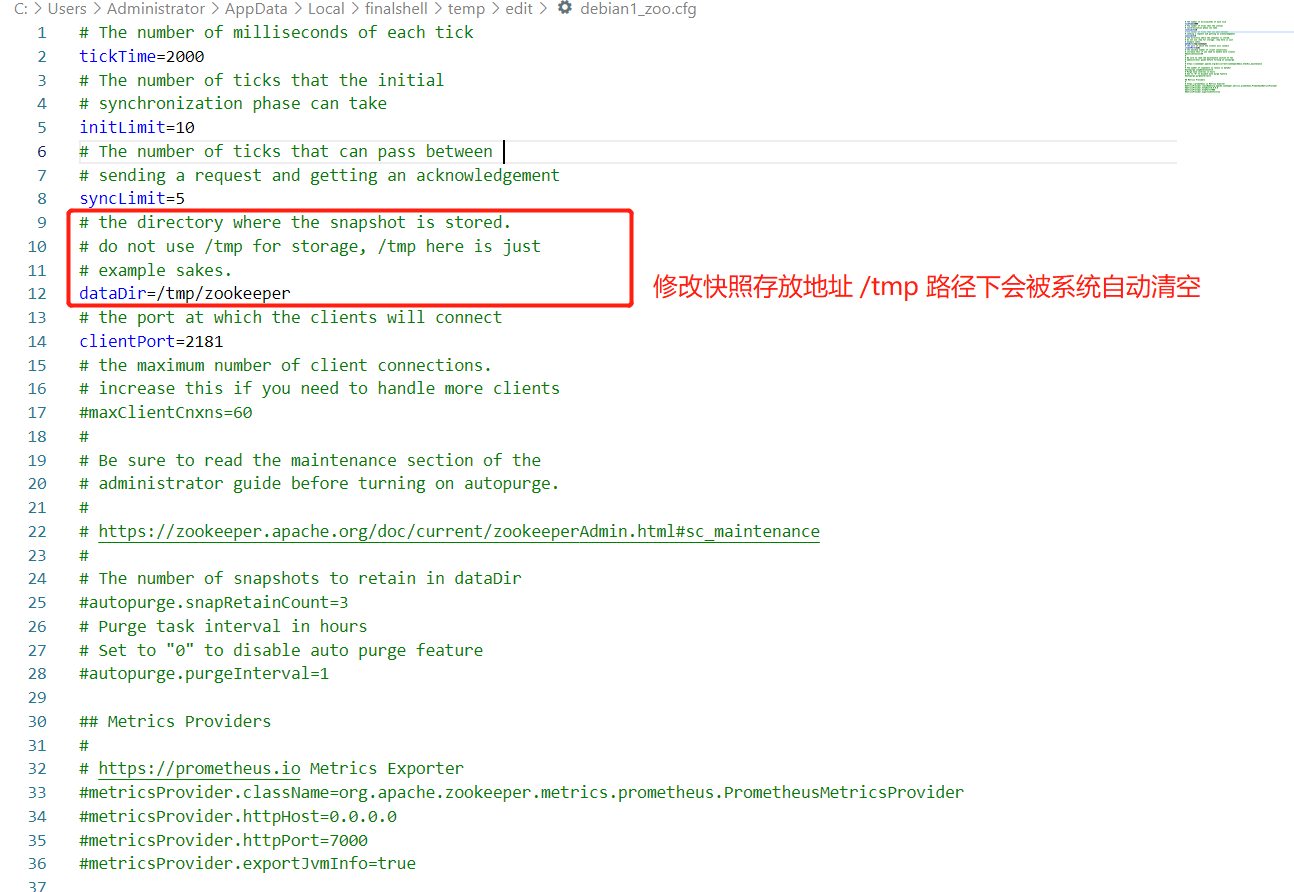
Remember to save after editing. I set the path to /opt/zookeeper/data; the other nodes all need the same setup later.
Creating the myid file
In the folder at the updated dataDir path, create a myid file and write the node's unique ID into it.

Each of the other nodes also needs its own ID set — no duplicates allowed.
Configuring the cluster member list
Add the server entries to zoo.cfg on every node:
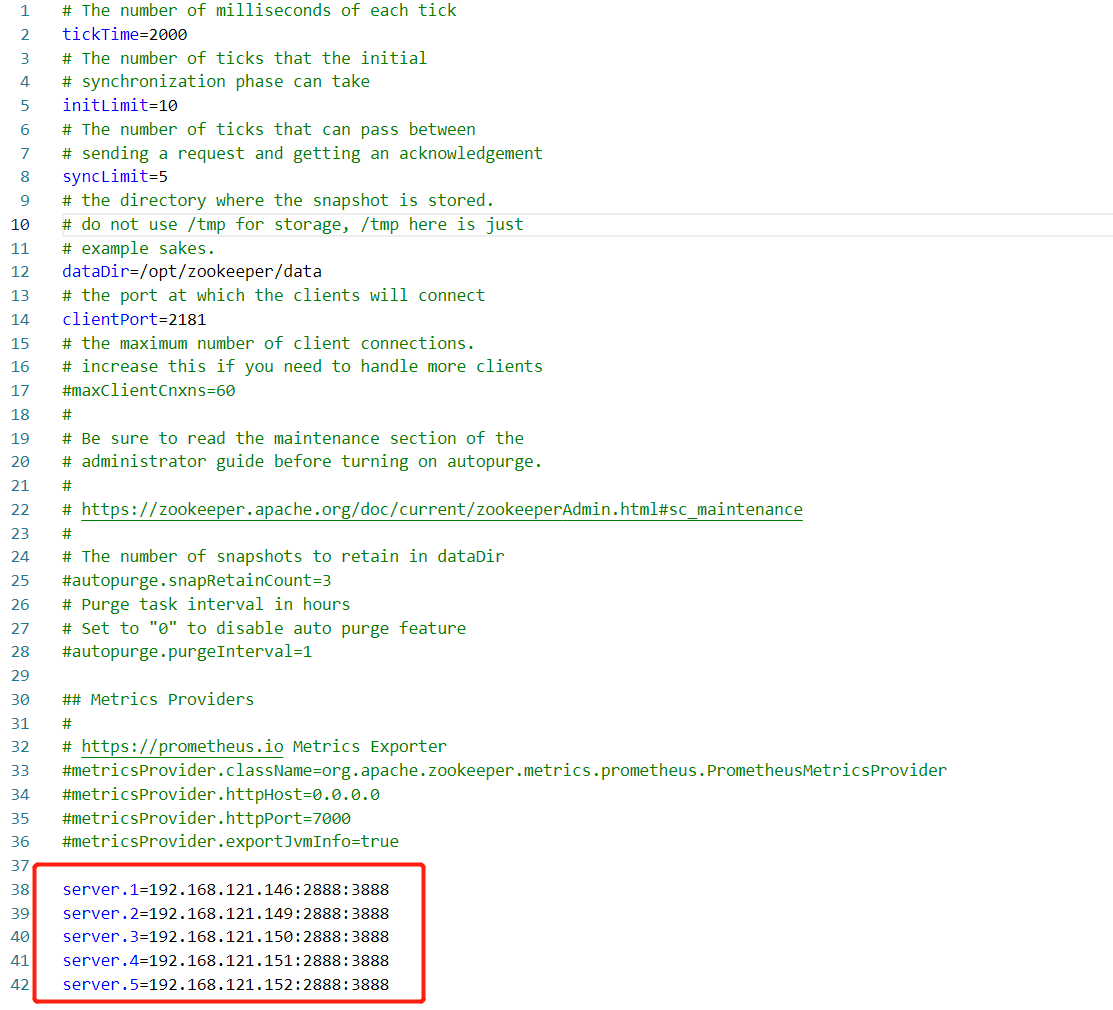
The 1 in server.1 corresponds to the ID in myid; the value after it can be a node IP or a hostname. Port 2888 is used for data synchronization, and port 3888 for election voting.
Starting all the nodes
If fewer than half the nodes are up, the cluster won't serve anything:

At this point it throws an exception and refuses ZK connections, so all nodes need to be started.
Verifying the cluster
Once every node is up:

You can check each node's role and running state with zkServer.sh's status command.
Connect to the cluster with zkCli.sh and run some commands to make sure everything works:
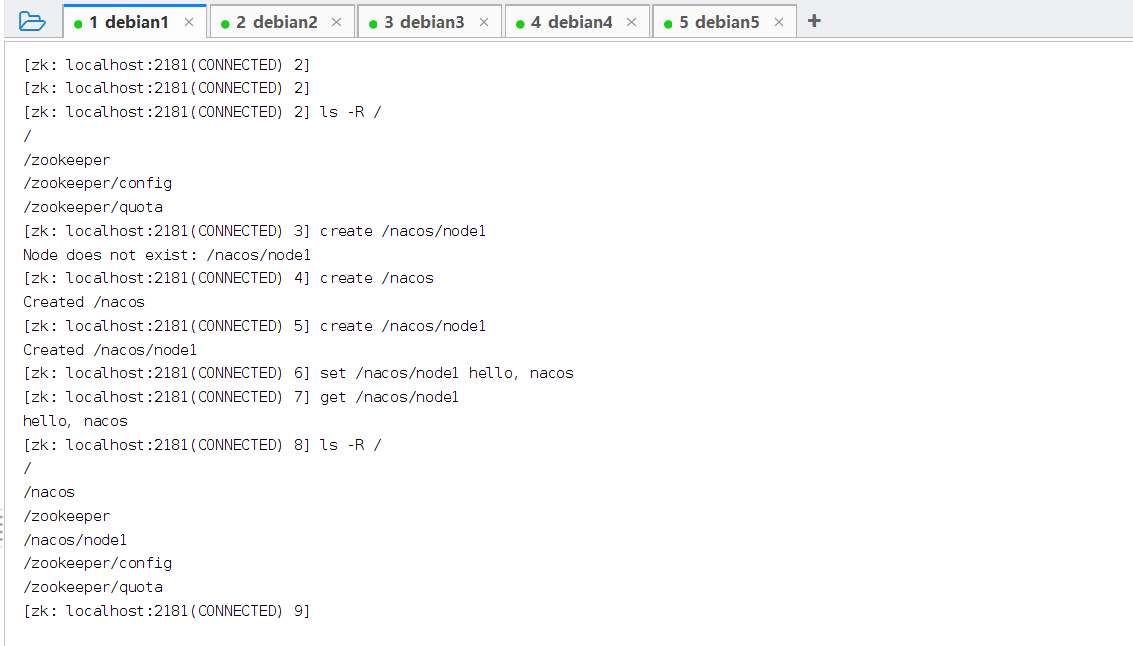
Then test with commands on the other nodes:
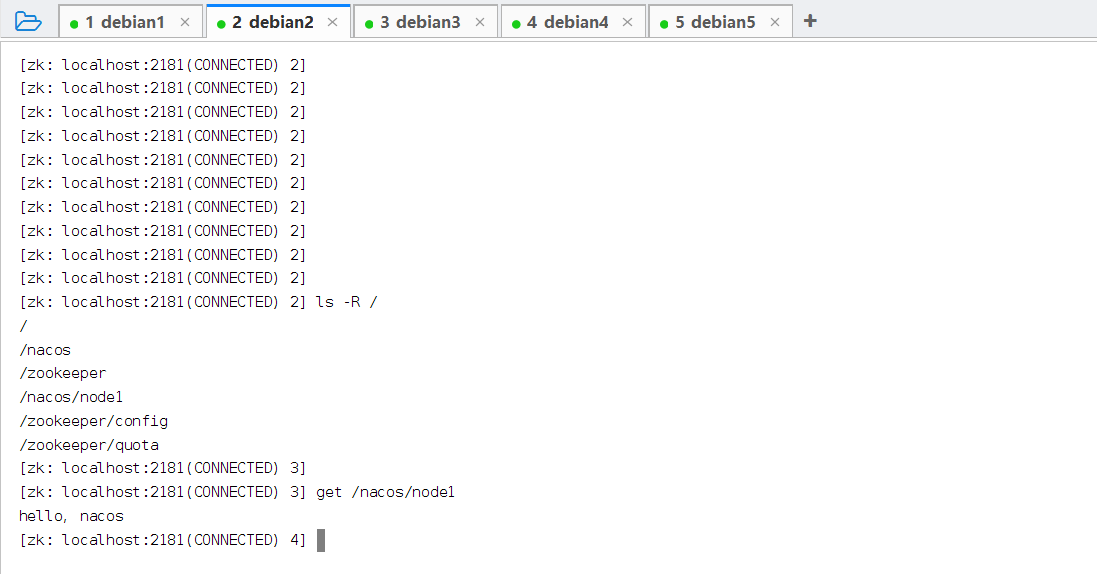
Everything checks out — the simplest possible ZK cluster is up and running. This build followed the most basic flow; you can keep tuning the cluster through configuration later, and harden it with SSL communication and passwords for better security.
A failure experiment
Let's push the testing further: stop the Leader node and see whether the cluster automatically elects a new one.
Find the Leader node and shut down its service.
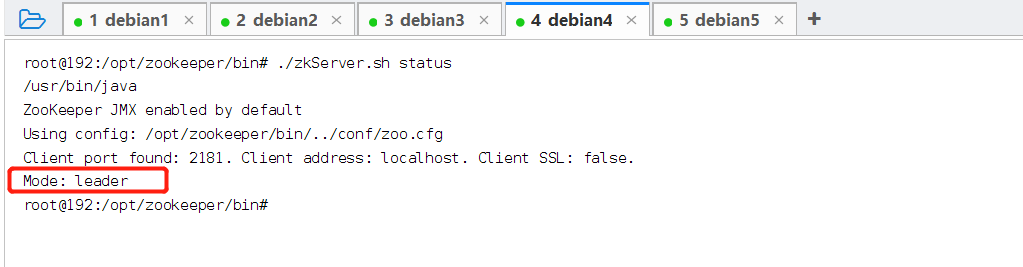
The current Leader is the debian4 server, so we immediately run zkServer.sh stop to shut down its ZK service.
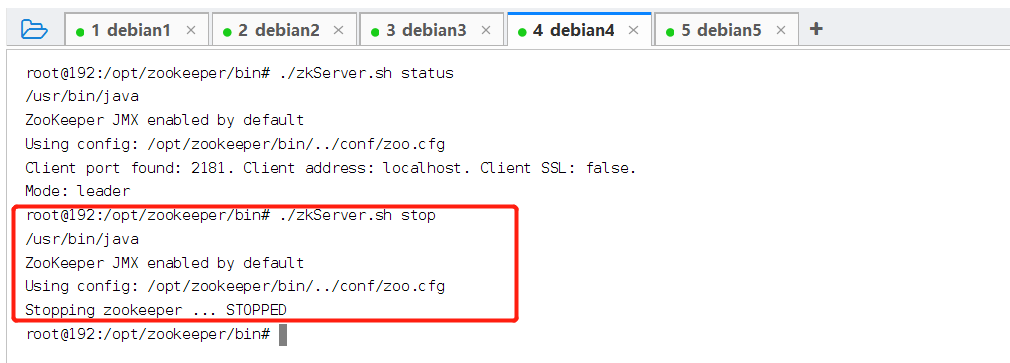
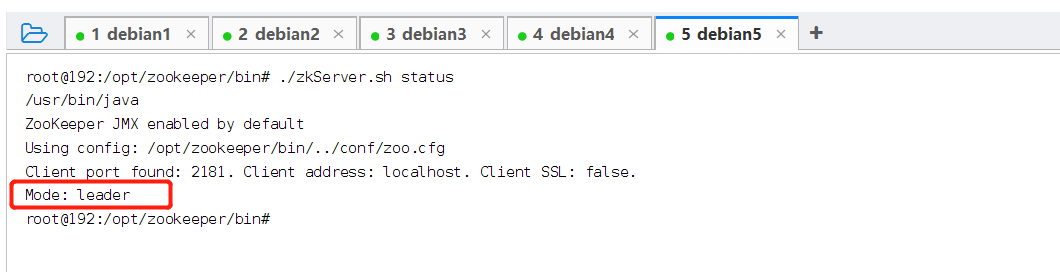
Checking with zkServer.sh status, the debian5 server has been elected as the new Leader — cluster elections are working exactly as they should.
Official configuration parameters: ZooKeeper: Because Coordinating Distributed Systems is a Zoo (apache.org)
Wrapping up
This build followed the most basic flow: change dataDir, write myid, register all the server nodes in zoo.cfg, then start them one by one. The core rule governing whether the cluster can serve requests boils down to one thing — a majority of nodes must be alive. The failure experiment confirmed it: after stopping the Leader, the remaining nodes quickly elected a new one with no service interruption. Once you understand the Znode model and ZAB's majority-acknowledgment mechanism, the design intent behind all these configuration options falls into place. Before using this in production, you should still add SSL and authentication.
COMMENTS