The 7-Layer Network Model
When troubleshooting network problems, the go-to approach is to isolate the issue layer by layer: is the cable connected, can you ping the IP, is the port listening, what did the application return. That whole approach traces back to the OSI seven-layer model. Here I go through what problem each layer solves, as a reference note for myself.
First, why layering at all. Network communication has too many concerns to handle at once: how signals travel over the medium, what to do about errors, how to find the other party across networks, how applications agree on data formats. By splitting these concerns by responsibility — each layer depending only on the services of the layer below and exposing an interface only to the layer above — every layer can be designed and swapped out independently. The OSI model slices the whole process into seven layers, bottom to top: physical, data link, network, transport, session, presentation, and application.
Physical layer
This layer solves the problem of how two pieces of hardware communicate. Common physical media include optical fiber, cables, and repeaters. It mainly defines physical device standards, such as connector types for network cables and fiber, and the transmission rates of various media.
Its main job is transmitting bit streams (1s and 0s converted into stronger or weaker electrical signals for transmission, then converted back into 1s and 0s at the destination — the familiar digital-to-analog and analog-to-digital conversion). The data unit at this layer is the bit.
In other words, the physical layer only cares about electrical and mechanical characteristics — what voltage counts as a 1, what the connector looks like, how many bits per second — with no understanding whatsoever of what is being transmitted. A NIC's physical interface and hubs operate at this layer.
Data link layer
Because of all kinds of interference in computer networks, physical links are unreliable. This layer's main job is to use control protocols to turn an error-prone physical channel into an error-free data link that can reliably transmit data frames.
Concretely, it takes the bit-stream data from the physical layer, packages it into frames, and passes them up; likewise, it unpacks frames from the layer above into bit streams and forwards them to the physical layer. The data unit at this layer is the frame.
Only after framing is there a boundary defining where a piece of data starts and ends, which also makes it possible to append a checksum at the end of the frame for error detection — corrupted frames are simply dropped. This layer uses MAC addresses to identify devices on the same link; Ethernet and switches operate here, which is why switches are often called layer-2 devices.
Network layer
With many computers on a network, how do you find the one you want to send to? And with multiple nodes in between, how do you choose the path? That is what routing does.
This layer's main task is to use routing algorithms to select the most suitable path through the communication subnet for packets (this layer's data unit, packaged from the layer above). This layer defines IP addresses and addresses hosts by them, which is where the IP protocol comes from.
The difference from the link layer is scope: MAC addresses are only meaningful within a single link, while IP addresses work across the whole network. Every time a packet passes through a router, the link-layer frame is stripped and rebuilt, but the IP-layer source and destination addresses stay the same end to end. Note that IP itself is "best effort" — it only tries to move packets toward the destination, guaranteeing neither delivery nor ordering; reliability is left to the layers above. Routers are the classic layer-3 device.
Transport layer
When sending large amounts of data, packet loss is likely, and the receiving machine needs to report whether it got everything. If something is missing, it says which packets were lost so they can be resent, repeating until everything arrives.
Simply put, the transport layer's main job is to monitor the quality of the data transmission service and ensure packets are delivered correctly.
The transport layer also solves another problem: an IP address only identifies a host, but a host runs many processes — who should actually receive the data? The answer is port numbers; IP plus port pins down a specific process. The two most famous protocols at this layer are TCP and UDP: TCP is connection-oriented and achieves reliability through acknowledgments, retransmission, and flow control; UDP is connectionless, offering no reliability guarantees but low overhead, suited to latency-sensitive scenarios where losing a little data doesn't matter.
Session layer
At this point we can already deliver correctly packaged data to the right computer. But we can't be expected to manually invoke the transport protocol to package data and then invoke IP to find a route every single time — we need automatic send/receive and automatic addressing. Hence the session layer: its role is to establish and manage communication between applications.
It handles session establishment, maintenance, and teardown — the entire lifecycle of a conversation between two parties, from "start talking" to "stop talking," is managed here.
Presentation layer
The presentation layer handles data format conversion: transforming application data into a format suitable for network transmission, or converting data from the layer below into a format the layer above can process.
Typical work includes character-encoding conversion, encryption/decryption, and compression/decompression. Two machines may represent data differently internally; the presentation layer ensures that data sent by one side is correctly understood by the other.
Application layer
The application layer is the interface between computer users (and their applications) and the network. Its function is to provide services directly to users, accomplishing whatever they want to do over the network.
The protocols we deal with most day to day all live here: HTTP for browsing the web, FTP for transferring files, SMTP for sending mail, DNS for name resolution.
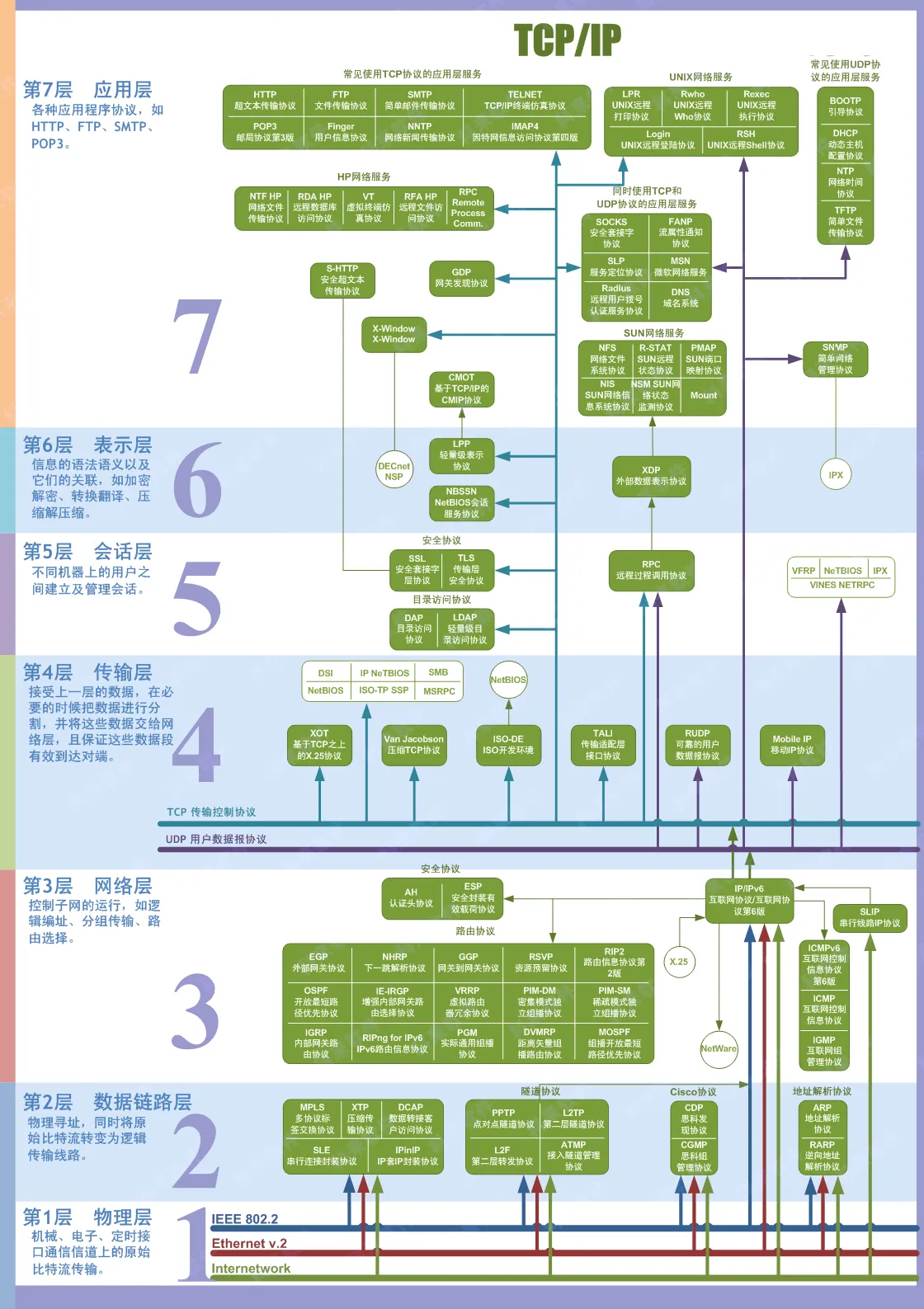
Relationship to the TCP/IP model
OSI is a conceptual model; the protocol stack the real Internet runs on is TCP/IP. TCP/IP is usually divided into four layers: the network interface layer maps to OSI's physical and data link layers, the internet layer to the network layer, the transport layer to the transport layer, and the session, presentation, and application layers are merged into a single application layer. That's why you rarely see standalone session- or presentation-layer protocols in practice — their responsibilities are mostly absorbed by application-layer protocols or by the applications themselves.
Pitfalls and caveats
-
The data units are easy to mix up: bits at the physical layer, frames at the data link layer, packets at the network layer, segments at the transport layer. This comes up constantly in both debugging and interviews.
-
The device-to-layer mapping is worth memorizing: hubs work at the physical layer, switches at the data link layer, routers at the network layer. The terms "layer-2 switch" and "layer-3 switch" come from exactly this.
-
To decide which layer a protocol belongs to, look at what problem it solves rather than guessing from the name. DNS, for instance, is infrastructure but is an application-layer protocol; ARP maps IP addresses to MAC addresses and sits between the network and link layers.
You can standardize the layer-by-layer troubleshooting order: first check physical connectivity (cable, NIC lights), then link and IP (ping the gateway, ping the target), then the transport layer (is the port listening, does the firewall allow it), and finally the application's own logs. Eliminating layer by layer beats random guessing by a wide margin.
Wrapping up
The heart of the seven-layer model is separation of concerns: each layer solves one class of problems, provides services upward, and consumes services downward. The physical layer moves bits, the link layer makes a single link reliable, the network layer handles network-wide addressing and routing, the transport layer guarantees end-to-end delivery quality, and the top three layers serve the application itself. Once you understand what problem each layer solves, any specific protocol slots naturally into place — and you know which layer to start from when things break.
COMMENTS