Redis GUI Clients Worth Using
You can certainly inspect Redis data by running commands in the CLI, but it's nowhere near as efficient as a graphical interface — so here's a record of a few Redis GUI tools I use regularly.
Day-to-day Redis lookups tend to be small and scattered: confirming a key actually got written, checking what a serialized value looks like, verifying a TTL matches expectations. redis-cli can do all of that, but bouncing between keys / scan, type, ttl, and get / hgetall is slow going, and structured data like Hashes and ZSets is a pain to read as plain text. A good GUI client folds all of that into one screen — key list, data structure, TTL, all at a glance — so it's worth writing down the ones I've used, if only to make setup faster on the next machine.
Redis Desktop Manager
Paid, with a two-week trial. Cracked versions float around online, though they tend not to be the latest release.
RDM is the veteran of the bunch. Early versions were open source and free; it later moved to a paid subscription and rebranded as RESP.app, which is exactly why many people jumped ship to free alternatives. Feature-wise it's comprehensive: SSH tunneling, SSL connections, a built-in console for running commands directly, and mature rendering for all the data types. If your company is willing to pay, it remains a safe choice.
AnotherRedisDesktopManager
Open source, free, pleasant to use, with a clean good-looking UI.
The name itself is a bit of a jab at RDM going paid. Its headline trait is stability: it won't freeze or crash when loading huge numbers of keys, which matters a lot when a production database has millions of them — it uses scan for progressive iteration instead of pulling everything at once. Everything you need day to day is there: multiple connection management, SSH/SSL, cluster mode, a command-line terminal, a dark theme, and keys that fold into a tree view by delimiter. It's the one I mainly use these days.
QuickRedis
QuickRedis is a forever-free Redis visual management tool. It supports direct connections, sentinel, and cluster mode, handles keys in the hundreds of millions, and has a genuinely exciting UI. QuickRedis runs on Windows, Mac OS X, and Linux. It's a productivity tool: while others are busy hammering out commands, you're already sipping tea.
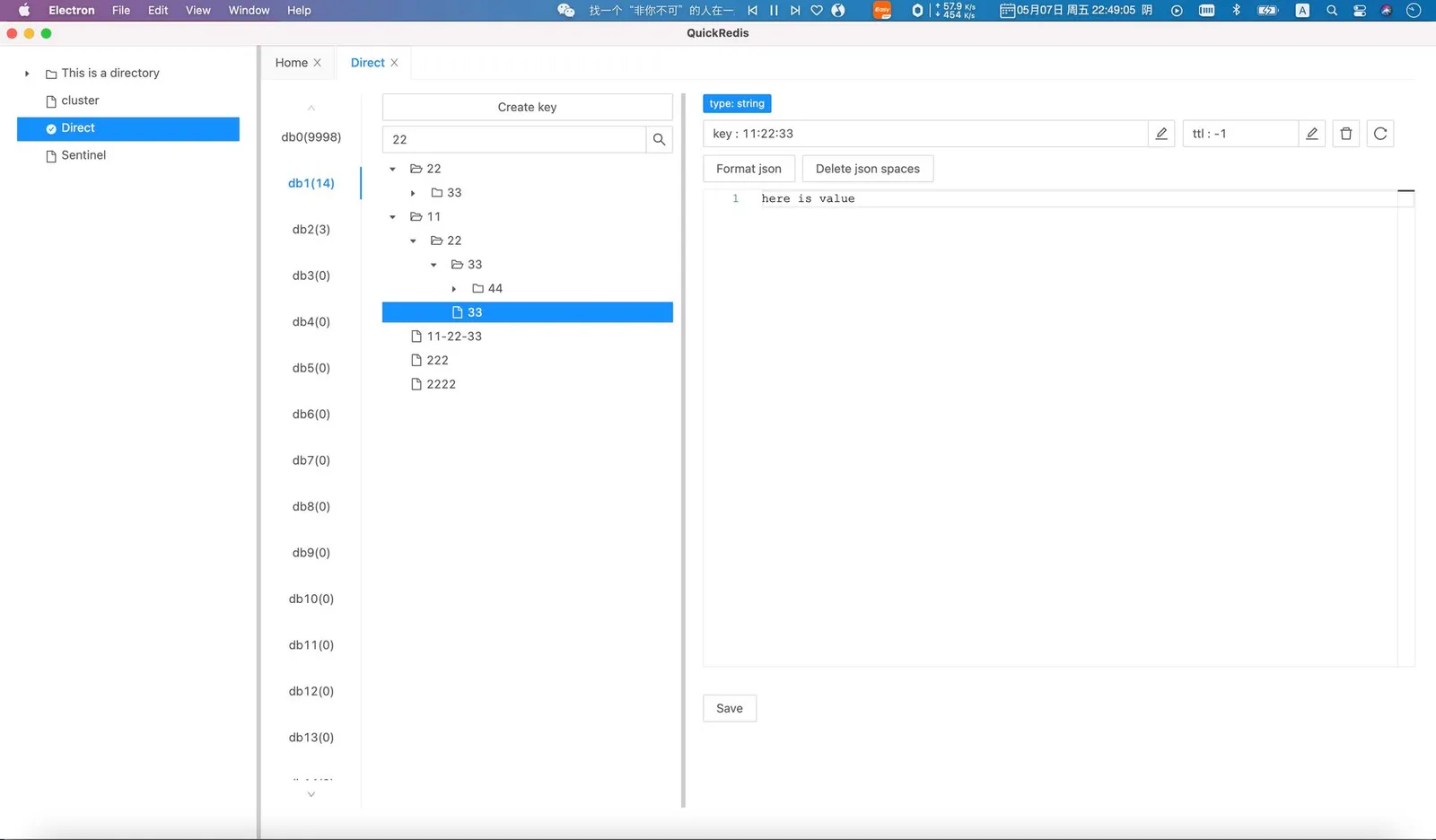
Its sentinel and cluster support works out of the box — no need to handle MOVED redirects yourself or hunt down the master node the way you would on the command line, which saves real effort when connecting to a production cluster. The interface uses a tree-directory style, organizing keys into a hierarchy by colon delimiter — very comfortable if you're in the habit of naming keys by business prefix.
Pitfalls and Caveats
-
Be restrained with production. In a GUI, deleting a key or editing a value is just a few clicks — the cost of a slip-up is lower than on the command line. Use a read-only account for production connections, or at least name the connections in a clearly distinguishable way, so test-database habits don't leak into production.
-
Watch out for full scans. Some clients use
keys *instead ofscanwhen rendering the key list, which blocks the Redis main thread on large databases. It's worth checking for this when picking a tool — AnotherRedisDesktopManager has a good reputation here. -
Garbled values usually aren't the tool's fault. Binary data written by application code via JDK serialization or Protobuf can only be displayed as raw bytes. Some tools let you choose a deserialization format or pretty-print JSON — check whether that option exists before use.
When connecting to a remote Redis, prefer an SSH tunnel over exposing port 6379 to the public internet. All the tools above support SSH connections.
Wrapping Up
Of the three: RDM (RESP.app) is the most feature-complete but paid; AnotherRedisDesktopManager is open source, free, and reliably boring in the best way — a solid default choice; QuickRedis is also free, with its tree UI and sentinel/cluster support as the highlights. None of them is absolutely better than the others — pick whichever feels right and pocket the time you save looking up data.
COMMENTS