The MySQL Execution Pipeline
From the moment a client submits a SQL statement to the moment the data actually hits disk, the statement passes through the connector, parser, optimizer, and executor, with the Buffer Pool and three logs working together behind the scenes. This post connects the entire execution pipeline end to end.
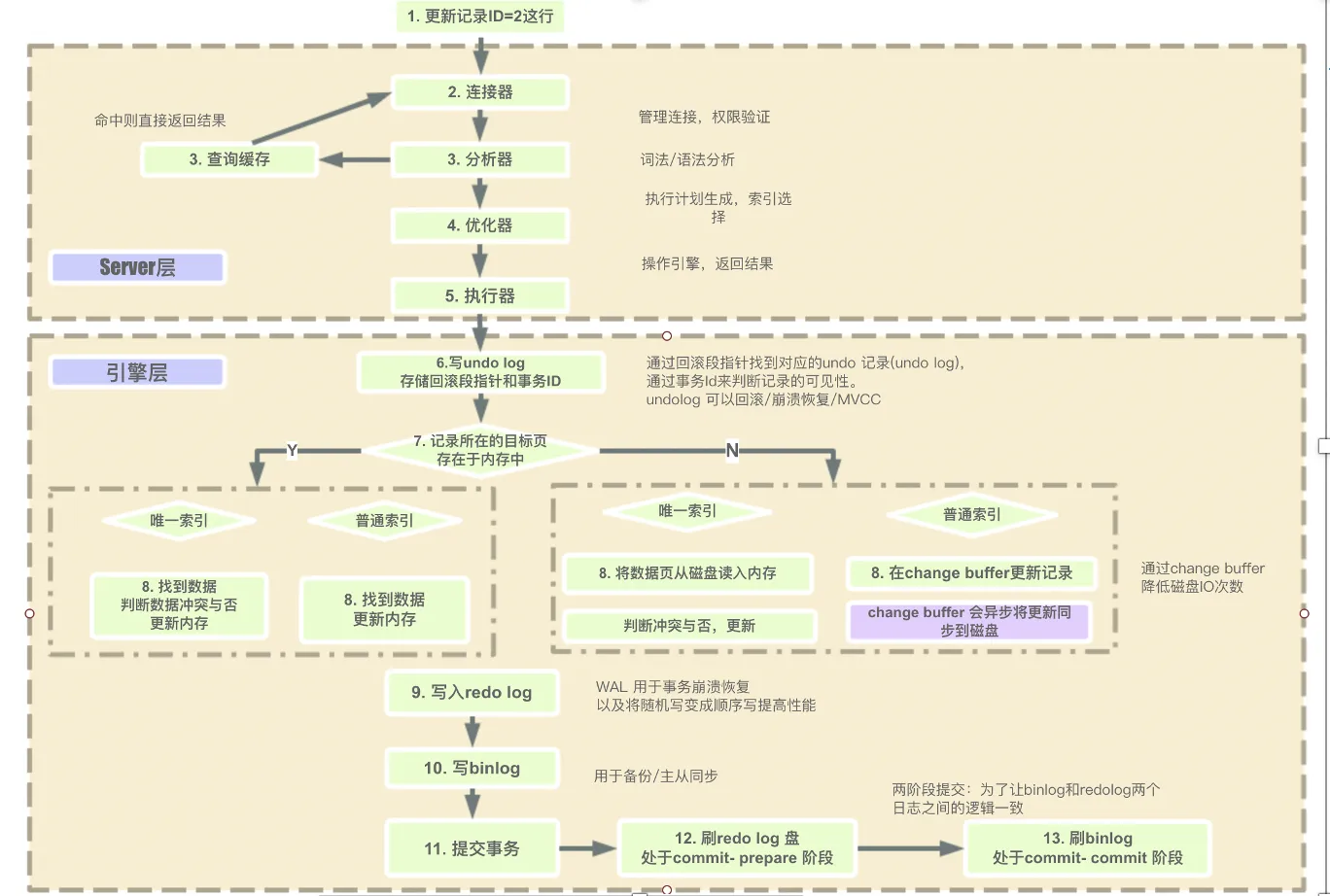
From Connector to Executor
When a client submits a SQL statement to the MySQL server, a connection must be established first. The connector handles the client connection and verifies the user's identity and privileges. If the check passes, the SQL parser performs semantic analysis on the statement (checking whether the SQL is valid and can be parsed). After parsing, the execution plan is optimized — for example, stripping useless conditions like 1=1, and choosing the best index and ordering of WHERE clause columns.
The statement is then handed to the executor, which runs it against whatever storage engine the database uses. MySQL was designed as two layers: the Server layer and the storage engine layer. The benefit is decoupling — you can pick the storage engine that fits each scenario.
Buffer Pool
InnoDB, the most commonly used storage engine, manages storage in units of pages (16KB). Every insert, delete, update, or query ultimately operates on a whole page: the entire page is loaded into the Buffer Pool, and all data operations happen inside the Buffer Pool. The Buffer Pool is typically configured to use around 70-80% of the server's memory, so data operations run directly in memory, which dramatically improves throughput. (If every DML statement required disk IO, the database's disk would quickly become the bottleneck — modifying one row would mean reading from disk and then flushing back, i.e. 2 IOs, one read and one write.)
An example makes this concrete. Assume there is no Buffer Pool, the user table has a single row with age = 1, and we need to run three statements:
Transaction A: update user set age = 2 (one read + one write, 2 IOs) Transaction B: update user set age = 3 (one read + one write, 2 IOs) Transaction C: update user set age = 4 (one read + one write, 2 IOs)
Each one has to read the data from disk into memory, modify it, then flush it back to disk — 6 IOs in total.
Now with a Buffer Pool:
Transaction A: update user set age = 2 (read into the Buffer Pool and modify, 1 read IO) Transaction B: update user set age = 3 (modify the data in the Buffer Pool, 0 IOs) Transaction C: update user set age = 4 (modify the data in the Buffer Pool and flush to disk, 1 write IO)
Only the first statement needs to load the data page; subsequent operations happen entirely in memory. With the Buffer Pool, the total drops to 2 IOs. (This is a simplified illustration — the real optimization logic isn't quite this simple — but the big picture holds: the Buffer Pool maps data from disk into memory for manipulation, reducing disk IO. The catch is that modifications happen in memory, so a crash or power loss could easily lose data.)
Inspecting Buffer Pool information:
-- The output includes Buffer Pool size, hit rate, dirty page count, and more
SHOW ENGINE INNODB STATUS
This is where several crucial logs come in to help: the Redo Log, the Bin Log (binary log), and the Undo Log (rollback log).
Redo Log
After data is modified, the new value is first recorded in the Redo Log on disk. Even if power is suddenly cut and everything in the Buffer Pool is lost, the Buffer Pool can be rebuilt from the Redo Log when power comes back. This keeps the Buffer Pool's in-memory efficiency while guaranteeing no data loss. The Redo Log has three flush strategies:
- Set to 0: no flush on transaction commit (by default the Master Thread syncs the redo log once per second)
- Set to 1: a synchronous flush on every transaction commit — the safest option, because if a crash happens at that point, the transaction never committed successfully, so there is nothing to recover (the default)
- Set to 2: on every commit, the Redo Log Buffer contents are only written to the Page Cache without syncing; the filesystem (OS) decides when to sync to disk
Redo Log flushing here is sequential-write WAL (Write-ahead logging). Compared with random disk writes, this is vastly more efficient — message queues like Kafka and RocketMQ also use sequential log writes to boost disk write throughput. Sequential disk writes are already fast, but still nowhere near memory speed. To push Redo Log efficiency further, InnoDB introduced the Change Buffer in memory (16MB by default, located inside the Buffer Pool, with a configurable percentage) to record changes in memory, only performing the sequential disk write when the transaction commits.
The Change Buffer is divided into many Blocks of 512KB each, and all the Redo Log produced by one transaction is called a Group.
Bin Log (Binary Log)
The Bin Log is a binary log recording all table schema changes (CREATE, ALTER TABLE, ...) and table data modifications (INSERT, UPDATE, DELETE, ...). It does not record operations like SELECT and SHOW, since those don't modify data — though you can check the general query log to see every statement MySQL has executed.
One thing to note: even an update that changes nothing still gets written to the Bin Log.
Like the Redo Log, the Bin Log has its own flush strategy, controlled by the sync_binlog parameter:
- Set to 0: before each commit, the Bin Log is written to the OS Cache, and the operating system decides when to flush it to disk
- Set to 1: the Bin Log is written to disk synchronously, bypassing the OS Cache
- Set to n: after every n transaction commits, Fsync is called once to force the Bin Log in the OS Cache to disk
The Bin Log has two common use cases:
- Replication: MySQL Replication enables the Bin Log on the Master, which ships its binary log to Slaves to keep Master and Slave data consistent.
- Data recovery: restoring data via the mysqlbinlog tool.
Which raises a question: both the Bin Log and the Redo Log record post-modification values — what's the difference? If we have the Redo Log, why do we still need the Bin Log?
Bin Log vs. Redo Log
- The Bin Log belongs to the MySQL Server layer; the Redo Log belongs to the Engine layer
- The Bin Log works with all engines; the Redo Log is InnoDB-specific
- The Bin Log records logical operations; the Redo Log records the updated content
- The Bin Log is append-only across multiple files; the Redo Log is a fixed-size set of files written in a circular fashion
- During transaction execution, operations are continuously written to the Redo Log; the Bin Log is only written at commit time
Undo Log (Rollback Log)
When data is modified, alongside the Redo Log a corresponding Undo Log is also recorded. If the transaction fails or is rolled back for any reason, the Undo Log makes the rollback possible. Undo Logs are recorded in segments — each Undo Log operation occupies one Undo Log Segment. Their purpose: preserving a version of the data as it was before the transaction, usable both for rollback and for reads under multi-version concurrency control. Note that the Undo Log lives in the global tablespace by default — you can loosely think of the Undo Log as being stored in a MySQL table of its own, so inserting an Undo Log entry is similar to inserting an ordinary row. Which means that writing the Undo Log itself also involves writing the Redo Log.
The Execution Pipeline
With the groundwork above in place, here is the full execution pipeline of a SQL statement:
-
We skip the connector, parser, and optimizer steps here (described above).
-
First, the Undo Log records the rollback information for this transaction (transaction ID, rollback pointer), enabling rollback and the MVCC transaction isolation that depends on it.
-
Next, the data in the Buffer Pool is modified, and the change information is simultaneously added to the Change Buffer. If the target data page is not yet in memory, then — provided data consistency is not affected — InnoDB caches these updates in the Change Buffer first, avoiding the need to read the page from disk. The next time a query needs that page, the page is read into memory and the Change Buffer operations related to it are applied. (In some cases, though, the page must be read into memory before the operation can proceed.)
-
After the change information lands in the Change Buffer, it must also be flushed to the Redo Log for durable storage, so a crash cannot lose the operations. (Flushing here only happens after the transaction commits — flushing an uncommitted transaction is pointless. MySQL defaults to synchronous Redo Log flushing; if you switch to asynchronous flushing, a sudden crash or power loss will lose data, including everything recorded in the in-memory Change Buffer.)
-
The concrete SQL operation is also added to the Bin Log Cache — but the Bin Log Cache records only logical operation information (the actual DML, DDL, and DQL statements executed), not data change details. The Bin Log Cache is a per-thread private memory area (32K by default) sized to hold the Bin Log Events generated by an entire transaction; a large transaction can easily exceed this setting, in which case a temporary Bin Log file is used for storage.
-
When the client commits the transaction, two-phase commit begins. First the Redo Log records are flushed to disk and marked with the prepare state; then the Bin Log records are flushed, and once the Bin Log flush succeeds, the corresponding Redo Log state is changed from prepare to commit. The two logs must be kept consistent — if they diverge, you get master-slave inconsistencies and all sorts of problems. At this point the client can be told the commit succeeded, but the data (dirty pages) has not yet hit disk; it still lives in the Buffer Pool. Only the corresponding log records have fully succeeded.
-
The MySQL server asynchronously flushes the dirty pages in the Buffer Pool to disk (at the right flushing moments). Only once the dirty pages are written to disk is the data truly persisted. If a crash or power loss happens during this asynchronous flushing, InnoDB can replay the Redo Log on startup to rebuild the previous Buffer Pool state.
The Right Moments to Flush Pages
-
The Redo Log is full. As the durability guarantee, the Redo Log must record every update. If it runs out of space, pages must be flushed to sync data to disk, after which the Redo Log's CheckPoint pointer moves forward to free up space. If memory is not under pressure at that point, the flushed pages don't need to be evicted.
-
Memory can't hold any more data pages. Queries read data pages from disk into memory before returning results. If memory runs out, the least recently used pages must be evicted — and if an evicted page is dirty, it must be flushed to disk before eviction.
-
The database is idle. When the database considers itself idle, it flushes dirty pages; if memory is not under pressure, flushed pages are not evicted.
-
The database shuts down normally. On shutdown, pages are flushed as well, persisting prior modifications to disk.
Wrapping Up
MySQL improves durability performance through sequential log writes, and the Buffer Pool maps disk data into memory for DML operations, dramatically boosting throughput. Asynchronous flushing avoids the poor performance of random disk writes caused by modifications scattered across different tables and rows. The Redo Log guarantees recovery after a crash, the Bin Log powers replication and data recovery, and the Undo Log handles rollback and MVCC — together with two-phase commit, the three logs strike the balance between performance and data consistency.
COMMENTS