How Docker Works
Notes on Docker's internal architecture, how containers are implemented, and the underlying storage model.
Internal Architecture Components
| Component | Description |
|---|---|
| Docker Daemon | Docker's main component, a daemon process responsible for creating, starting, stopping, and deleting containers. |
| Docker Client | The command-line tool that talks to the Docker Daemon; users send commands through it to operate containers. |
| Docker Registry | The central repository for Docker images; the Docker Client can pull the images it needs from it. |
| Docker Image | The basis of a container: a read-only file system containing the application, dependency libraries, configuration files, and so on. Built from a Dockerfile. |
| Docker Container | An instance of a Docker image, containing a complete file system, runtime environment, and system tools. |
The Docker Daemon and Docker Client communicate over a RESTful API: the Client sends commands to the Daemon, the Daemon receives and handles them, and finally returns the result to the Client.
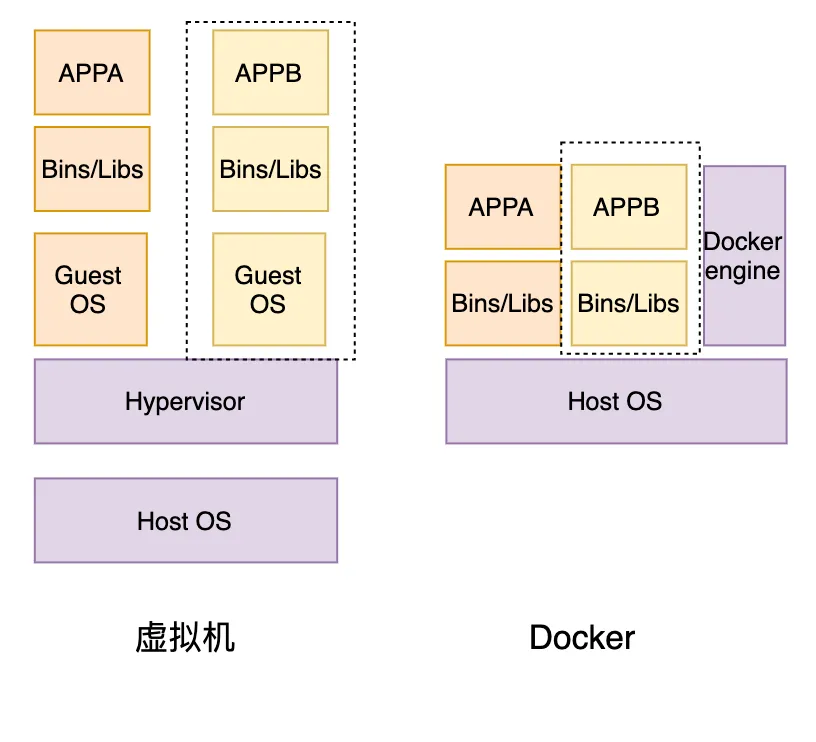
When the Docker Daemon receives a command to create a container, it first checks whether the required image already exists locally. If not, the Daemon pulls it from the Docker Registry; if it does, the Daemon creates a container from that image and runs it inside its own isolated namespace.
While a container is running, the Daemon routes its output and error messages to stdout and stderr, and users can view the container's output through the Client. When the container is no longer needed, the user sends a stop command via the Client. The Daemon sends SIGTERM to the processes inside the container so they can exit gracefully; if they haven't exited within a certain window, the Daemon sends SIGKILL to force-kill them.
How Containers Are Implemented
Docker containers rest on a few mechanisms:
- Namespaces: Docker uses namespaces to isolate processes, networking, file systems, users, and other resources between containers. Each container has its own namespaces, keeping containers independent of and invisible to one another.
- Control Groups (Cgroups): Docker uses Cgroups to limit the CPU, memory, network bandwidth, and other resources a container can use. Each container gets a resource quota, so containers share the host's resources fairly.
- Union File System: Docker uses a union file system to isolate container file systems. Each container has its own file system, yet can share parts of the host's. This keeps container file systems extremely lightweight, so they can be created and destroyed quickly.
- Container images: containers are created from images — read-only file systems containing the application, dependency libraries, and configuration. Docker uses the union file system to store images in layers, so images can be shared and reused, dramatically cutting storage space and download time.
- Container runtime: Docker uses a container runtime to start and manage containers. The runtime creates the container's namespaces, Cgroups, and union file system, then launches the processes inside. It also monitors container state and resource usage, adjusting resource quotas as needed.
Docker's operating model, then, is the interaction between the Docker Daemon and the Docker Client to create, start, stop, and delete containers. Images are the foundation of containers and can be built from Dockerfiles; containers run in isolated namespaces, providing isolation and security.
Underlying Storage
Docker's storage model comes down to two things: container images and data volumes.
Image storage
Docker uses a union file system to store images in layers. An image is made up of multiple read-only layers, each of which can be shared and reused. When a container starts, Docker unions those read-only layers together and stacks a writable layer on top, forming the container's file system. This keeps images very lightweight and containers fast to create and destroy.
By default Docker uses AUFS (Advanced Multi-Layered Unification File System) as the union file system, which supports multi-layer unioning, fast creation and teardown, and read-only layer sharing. Docker also supports other union file systems, such as OverlayFS, DeviceMapper, and Btrfs.
Data volume storage
A data volume is a directory or file a container can read and write, used for sharing data between containers, persistent storage, and so on. Docker supports several volume types, including host bind mounts, named volumes, and anonymous volumes.
A host bind mount maps a directory or file on the host into the container, which can then read and write it. A named volume is managed by Docker and can be given a name, making it easy to manage and share. An anonymous volume is generated automatically by Docker for a container's temporary data.
Volume storage is built on Linux's file system mount mechanism. When a container starts, Docker mounts the volume at the specified path inside the container; data written to that path lands on the volume. When the container stops, Docker unmounts the volume, and the data stays on it — that's how persistence works.
Wrapping Up
Docker's architecture isn't complicated: the Client sends instructions to the Daemon over a RESTful API, and the Daemon handles image pulls and the full container lifecycle. Containers themselves rely on Linux Namespaces for isolation and Cgroups for resource limits, while the union file system underpins layered image storage and the container's writable layer. Persistence is delegated to data volumes, whose mount mechanism keeps data independent of the container's lifecycle. Once you understand these mechanisms, the "lightweight, portable, reusable" qualities of containers pretty much explain themselves.
COMMENTS