Dinky
Introduction
Anyone doing real-time computing has probably felt this: Flink itself is powerful enough, but the development and operations experience around it is not friendly. Finished SQL has to be packaged and submitted, debugging means digging through logs, multiple clusters are each managed on their own — and once the number of jobs grows, things get messy. While researching tooling for a real-time data warehouse recently, I came across Dinky. These notes cover which of those problems it solves.
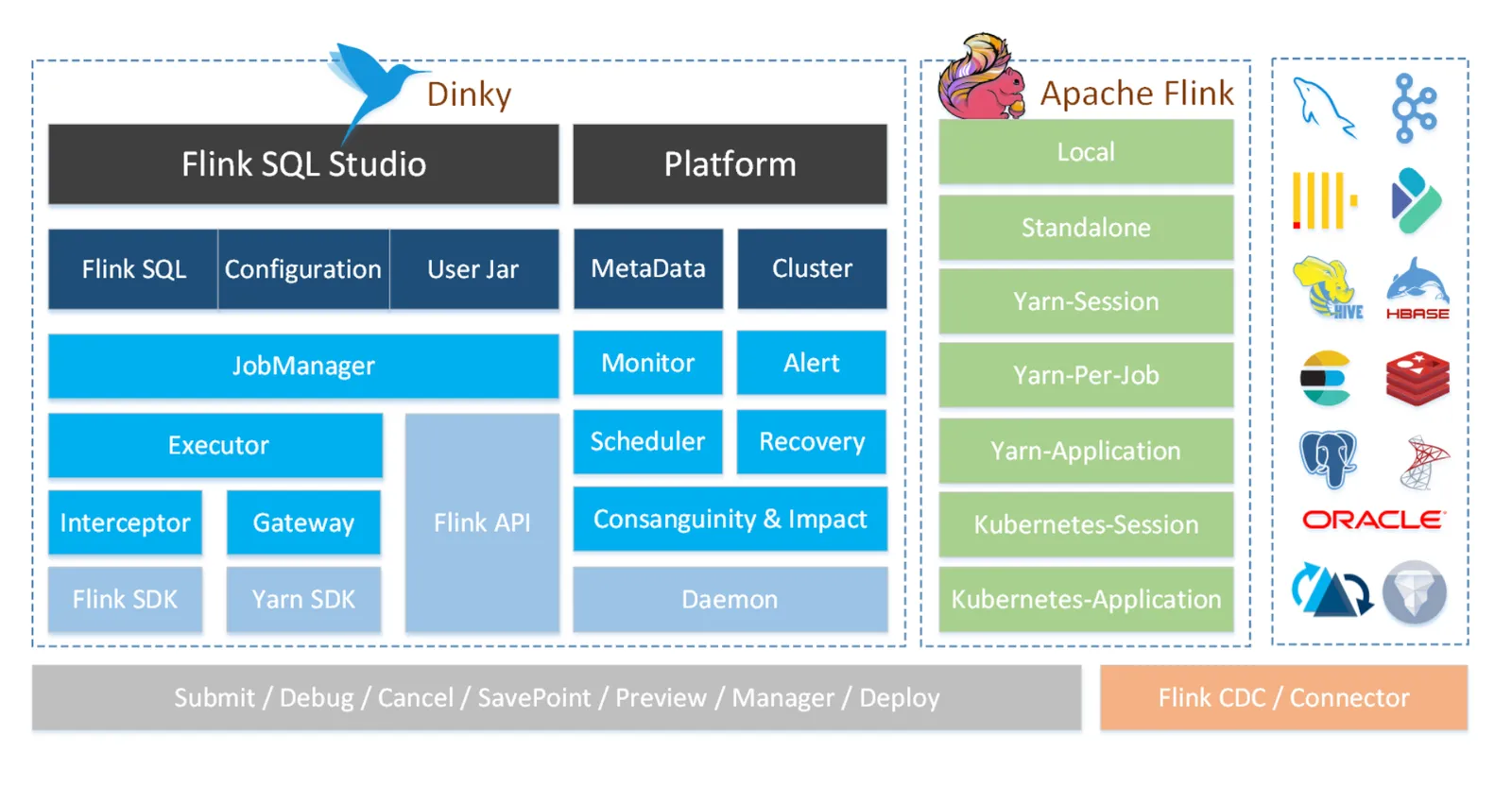
Dinky is an open-source platform for developing and managing Flink jobs. Its design is lightweight and easy to use, and it can manage multiple Flink clusters from one place. Developers can write and debug Flink SQL online through the web console, then submit it to a chosen Flink cluster with one click, dramatically lowering the development and operations cost of real-time computing tasks.
In other words, it pulls the entire chain of "write SQL, debug, submit, monitor" into a single browser page. Compare that with the native Flink workflow — write code locally, build a jar, submit from the command line, then check status in the Flink Web UI — and this one-stop experience is a huge time-saver for SQL-first real-time job development.
Project Home
https://github.com/DataLinkDC/dinky
Features
Dinky ships with built-in whole-database synchronization, which can sync database tables from microservice systems into a real-time data warehouse — an effective answer to the data-silo problem in microservice architectures.
This point deserves elaboration. Under a microservice architecture, every service has its own database, and analytics often needs to bring together tens or hundreds of tables. With native Flink CDC, you typically write one source definition per table — tedious at scale, and it eats up a lot of database connections. The idea behind whole-database sync is: one job reads the change log for the entire database (e.g., MySQL's binlog), then splits the stream by table inside the job and writes to downstream targets. Both the configuration burden and the resource footprint are much smaller.
Dinky also supports developing and managing Flink SQL across multiple Flink versions, and provides data lineage analysis to help developers see data flows and dependencies clearly, which makes troubleshooting and system maintenance easier.
The value of lineage analysis only becomes obvious once job counts grow. When a result table shows anomalous data, you can trace up the lineage graph to the intermediate and source tables it depends on, instead of relying on memory or reading through code. Conversely, before decommissioning or changing a table, you can first see exactly which downstream jobs would be affected.
Overall, Dinky is quite complete across real-time data development, job management, and data governance. It is a genuinely practical Flink development platform and well worth adopting in real-time data warehouse projects.
Building a Real-Time Data Warehouse
With Flink SQL plus Dinky, you can quickly build real-time warehouse jobs, for example:
- Real-time user behavior analysis
- Real-time transaction statistics
- Real-time risk control systems
What these scenarios have in common: data keeps flowing in, and the business wants results at minute or even second granularity. A traditional offline warehouse running daily or hourly batches can't meet that freshness bar. Writing the logic as streaming jobs in Flink SQL and letting Dinky manage the lifecycle brings the development rhythm very close to writing offline SQL.
Data Synchronization and CDC
Using Dinky's whole-database sync capability, you can implement Change Data Capture (CDC) and stream data from business databases into a data warehouse or message queue in real time.
In a nutshell, CDC works by subscribing to the database's transaction log: every INSERT / UPDATE / DELETE leaves a record in the log, and the CDC tool parses those records into a stream of change events. Compared to periodic full-table scans, it is less intrusive on the source database, has lower latency, and can even capture deletes. A typical Flink SQL CDC source table definition looks roughly like this:
-- Declare a CDC source table that captures changes to the MySQL orders table in real time
CREATE TABLE orders_source (
  order_id BIGINT,
  user_id BIGINT,
  amount DECIMAL(10, 2),
  PRIMARY KEY (order_id) NOT ENFORCED
) WITH (
  'connector' = 'mysql-cdc',   -- Use the MySQL CDC connector to read the binlog
  'hostname' = '...',
  'database-name' = '...',
  'table-name' = 'orders'
);
In Dinky, this SQL can be debugged online and its results previewed; once confirmed, submit it to the cluster — no more repeated local package-and-verify cycles.
A Real-Time Data Development Platform
Dinky can also serve as a company's unified real-time computing development platform, giving data engineers a standardized development environment.
The point of a unified platform is not just convenience: SQL scripts are hosted centrally with version history, and jobs are submitted and operated the same way for everyone, so new team members don't have to first untangle everyone's personal submission scripts and environment quirks. For team collaboration, that often matters more than any single feature.
Pitfalls and Caveats
- Dinky itself does not run compute workloads — it is the entry point for submission and management. The Flink cluster still needs to be deployed and maintained separately, and version compatibility between the two should be confirmed in advance.
- Before using CDC whole-database sync, verify that the source database has its change log enabled (e.g., MySQL's binlog) and that the sync account has been granted the necessary privileges, or the job won't start.
- Online debugging is convenient, but the debug environment differs from the production cluster in resources and data volume. For jobs with complex logic, it's still wise to validate in a production-spec environment before going live.
When evaluating, just spin up a test environment and run the most complex pipeline in your own business end to end (say, whole-database sync of a large table plus a multi-table join in SQL). That tells you far more than reading a feature list.
Wrapping Up
What Dinky fills in is the "developer experience" gap in the Flink ecosystem: online SQL editing, one-click submission, whole-database sync, and lineage analysis cover most of the daily work of real-time warehouse development. If your team's real-time jobs are mostly Flink SQL and you've been missing a unified place to develop and manage them, it deserves a spot on your shortlist.
COMMENTS