PolarDB's Storage-Compute Separation
As businesses scale, traditional relational database architectures gradually expose bottlenecks: limited scalability, high storage costs, and concentrated read/write pressure. Cloud vendors designed a new architectural pattern to address this: storage-compute decoupling. This post analyzes PolarDB's storage-compute separation from an architectural perspective and compares it with AWS Aurora and the traditional MySQL architecture.
Background
PolarDB is a cloud-native database from Alibaba Cloud, and one of its core design principles is decoupling the compute layer from the storage layer. This architecture gives the database stronger elastic scalability and higher resource utilization.
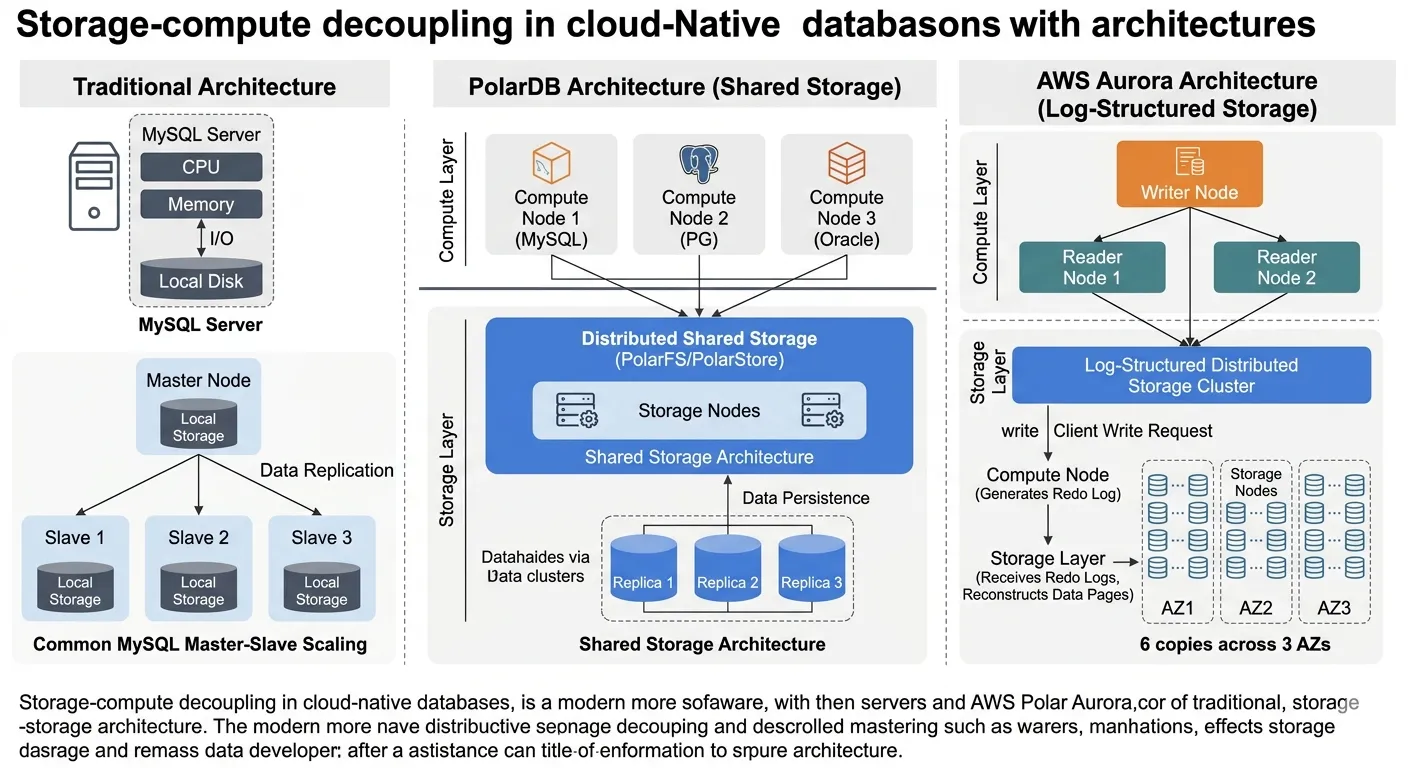
Problems with the Traditional MySQL Architecture
In a traditional MySQL setup, the database typically runs on a single server, with compute and storage on the same machine:
MySQL Server
 ├── CPU
 ├── Memory
 └── Local Disk      # data and compute bound to the same machine
This architecture was good enough in the early internet era, but as businesses grow, several obvious problems emerge.
1) Storage Is Hard to Scale
Database data usually lives on local disks. When data volume grows, the only options are upgrading the disk or moving to a bigger machine—scalability is limited.
2) Read Scaling Is Expensive
The common way to scale MySQL is primary-replica replication:
Master
 ├── Slave1      # each replica holds a full copy of the data
 ├── Slave2
 └── Slave3
Every read-only node needs a complete copy of the data. As read nodes multiply, storage costs grow rapidly, and replication pressure rises with them.
3) High Availability Is Complicated
If the primary node fails, a failover—manual or automatic—is required. Replication lag may exist during the switch, and data consistency needs extra handling.
PolarDB's Storage-Compute Separated Architecture
PolarDB's core design: compute nodes and storage nodes are fully decoupled. The architecture looks roughly like this:
          +--------------------+
          |    Compute Node    |
          | (MySQL / PG / ORA) |   # compute layer: SQL parsing, execution, transactions
          +---------+----------+
                    |
          +---------+----------+
          | Distributed Storage|   # storage layer: data, logs, replicas
          |     (PolarStore)   |
          +--------------------+
Compute nodes handle SQL parsing, query execution, and transaction processing; the storage layer handles data storage, log management, and replica replication. All compute nodes share a single distributed storage system—an approach known as Shared Storage Architecture.
What Storage-Compute Separation Solves
This design addresses several core problems of traditional databases.
1) Elastic Scalability
With a traditional database, adding compute capacity means upgrading the server. In PolarDB, you simply add compute nodes:
Storage Layer
   ↑
   │
Compute1      # new compute nodes need no data copy
Compute2
Compute3
All nodes share the same data, enabling read scaling, distributed computing, and scale-out in seconds.
2) Lower Storage Costs
Traditional MySQL read nodes each need a full data copy. Under storage-compute separation, multiple compute nodes share one storage system—no full copies needed—cutting storage costs significantly.
3) Stronger High Availability
PolarDB's storage layer typically uses a distributed replica mechanism:
Storage Node
 ├── Replica1      # multiple replicas guarantee durability
 ├── Replica2
 └── Replica3
When a node fails, the system can recover extremely quickly. This design enables automatic failure recovery, a highly available architecture, and durability guarantees.
4) Extreme Performance
PolarDB's storage layer typically uses distributed log structures, parallel I/O, and SSD cloud storage, which dramatically improves database performance. The main bottleneck shifts from the storage layer to internal network I/O.
PolarDB's Drawbacks
While storage-compute separation has many advantages, it also comes with challenges.
1) Network Latency
Separating compute from storage means data access goes over the network, adding some latency compared with local disks.
2) High Architectural Complexity
A storage-compute separated architecture requires designing a distributed storage system, network protocols, and data consistency mechanisms—far harder to build than a traditional database.
3) Heavy Dependence on Cloud Infrastructure
This architecture depends heavily on high-performance networking, distributed storage, and cloud platform scheduling, so it generally only fits cloud environments.
PolarDB vs AWS Aurora
PolarDB and Aurora are very close in overall design philosophy. Both are archetypal cloud-native database architectures, and both adopt compute + storage decoupling.
Aurora separates compute nodes from a distributed storage cluster, with multiple compute nodes sharing the same storage system. A sketch of the architecture:
          Writer Node
               |
       +-------+-------+
       |               |
   Reader1         Reader2         # readers share the underlying storage
       |               |
   +-----------------------+
   |   Distributed Storage |
   +-----------------------+
Aurora's distributed storage is typically deployed across multiple Availability Zones for higher availability. In their concrete implementations, however, the two still differ in important ways.
1) Storage Architecture Differences
Aurora's core design is log-structured storage. In Aurora, compute nodes do not write database pages directly; instead they send the redo log to the storage nodes, and the storage layer reconstructs data pages from those logs. Simplified, the flow is:
Client
↓
Aurora Compute Node
↓
Redo Log                    # only logs are shipped, not full data pages
↓
Distributed Storage Nodes
↓
Storage nodes reconstruct data pages
Aurora's storage layer typically consists of 6 replicas spread across 3 Availability Zones (AZs):
AZ1 : Storage Node A / Storage Node B
AZ2 : Storage Node C / Storage Node D
AZ3 : Storage Node E / Storage Node F
Writes commit with just a 4/6 quorum. This design brings several advantages:
- Writes only ship logs, so network traffic is smaller
- No need to fully replicate database pages
- Faster failure recovery
PolarDB's storage implementation is somewhat different. PolarDB uses a shared distributed storage architecture: compute nodes access the underlying PolarStore / PolarFS distributed file system directly, and database pages are still stored as pages. Simplified structure:
Client
↓
Compute Node (MySQL / PG / Oracle)
↓
PolarFS / PolarStore        # distributed file system, page-based storage
↓
Distributed Storage Nodes
This design stays closer to how traditional databases store data, so the data page format remains compatible and the changes to the database kernel are relatively small. On the write path, however, the amount of data going over the network can be larger than with Aurora's log-shipping approach.
2) Read Node Architecture
Aurora's read nodes are Reader Instances that generally handle reads only, with writes concentrated on the Writer Node. PolarDB supports a Reader Node + primary node with shared storage model, where multiple nodes access the shared storage directly, enabling more flexible read scaling.
3) Ecosystem and Compatibility Strategy
Aurora is a database engine deeply reworked by AWS; although compatible with MySQL / PostgreSQL, its internals have changed substantially. PolarDB places more emphasis on native database compatibility:
- PolarDB MySQL
- PolarDB PostgreSQL
- PolarDB Oracle
As a result, migrating applications to PolarDB often costs less in changes.
Wrapping Up
The essence of storage-compute separation is splitting a database's compute and storage into two layers that scale independently. Through shared distributed storage, PolarDB gains scale-out in seconds, low-cost read scaling, and stronger high availability—at the price of network latency and higher architectural complexity. Compared with Aurora, the two share a philosophy, but PolarDB takes the shared file system route, staying closer to traditional database storage with better compatibility, while Aurora uses log-structured storage to minimize write traffic. Understanding the trade-offs between these two routes is genuinely useful when evaluating cloud database options.
COMMENTS