The Architecture of OpenClaw
Most AI applications are still stuck at the surface level of "chat interaction" — the user types a question, the model returns text, but it never actually reaches the local device or executes real tasks. OpenClaw (formerly Clawdbot/Moltbot/Molty) breaks through this limitation: it fully decouples the model's "reasoning" from the local execution environment, upgrading AI from a "conversational assistant" to an "agent that can act autonomously." This post breaks down this TypeScript/Node.js open-source tool by Peter Steinberger across three dimensions: overall architecture, runtime logic, and design highlights.
Overall Architecture: A Hub-and-Spoke, Layered "OS-Grade" Framework
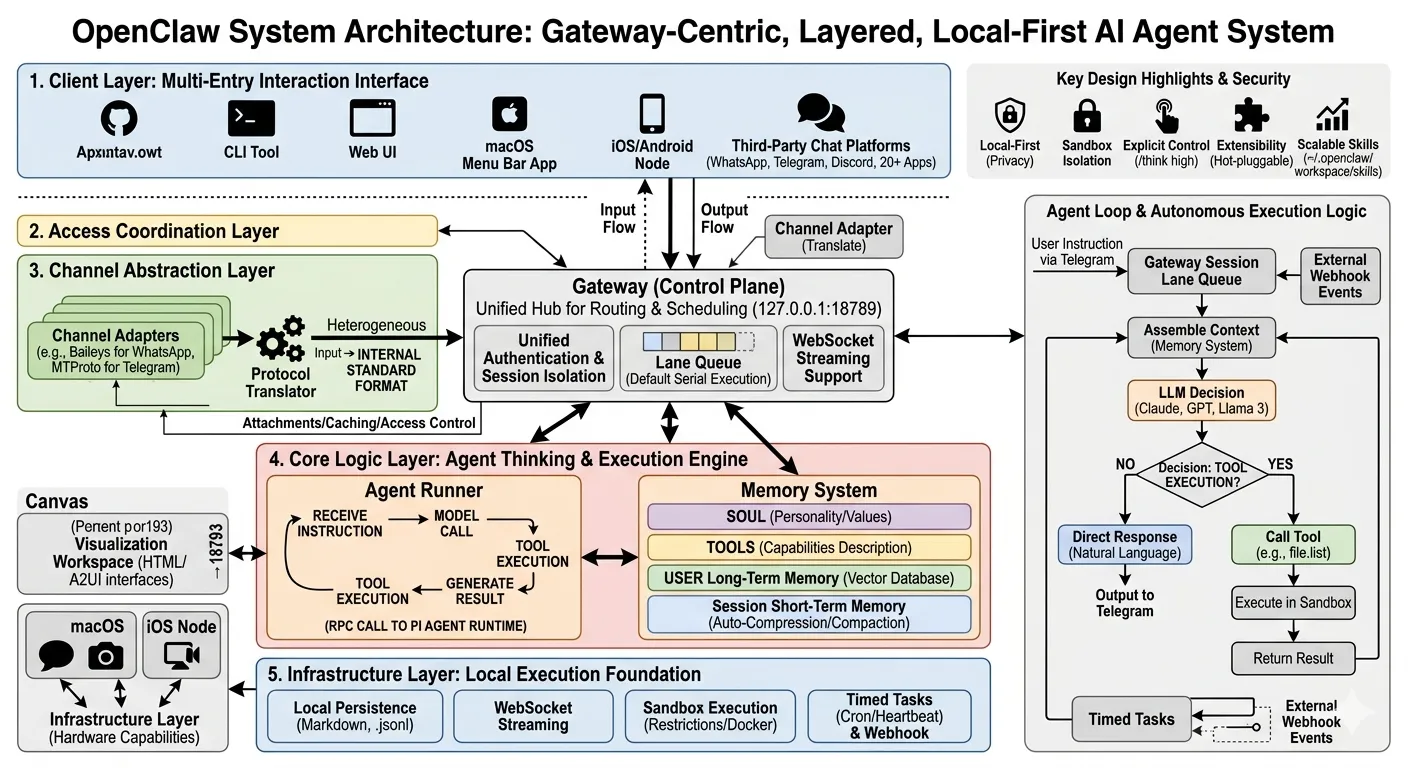
OpenClaw's core design philosophy is to "treat AI as an infrastructure problem, not a prompt-engineering problem" — the model only reasons, while the system owns state management, execution control, security, and multi-channel coordination. The architecture combines a hub-and-spoke topology with layered decoupling, keeping the core logic centralized and controllable while leaving individual components flexible.
Hub-and-Spoke: the Gateway as the Single Control Plane
OpenClaw is centered on the Gateway, with every component — clients, channel adapters, agent executors — radiating out from it. The Gateway is the system's "traffic hub." It binds to the local loopback address (127.0.0.1:18789) by default, allowing access only from the local device and protecting data privacy at the source. Its core responsibilities include:
- Unified authentication and session isolation: sessions from different users or devices are managed independently, preventing data from leaking across sessions;
- Lane Queue: each session executes tasks serially by default, eliminating state conflicts and interleaved logs from concurrent tasks (parallel mode can be enabled manually);
- Message routing and dispatch: forwarding normalized messages precisely to the corresponding agent;
- Streaming interaction: pushing model output and "typing" status in real time to simulate a natural conversation.
Layered Architecture: Capabilities Unpacked from the Outside In
OpenClaw's layers progress from user interaction down to infrastructure, each with clear responsibilities and independently extensible.
- Client layer: multiple entry points
Users don't need a dedicated app — they can interact with OpenClaw through:
- The command-line tool (CLI): great for technical users and quick debugging;
- The Web UI: a visual control panel;
- The macOS menu bar app and iOS/Android Nodes: lightweight mobile entry points;
- Third-party chat platforms: 20+ popular apps including WhatsApp, Telegram, and Discord, so users can issue commands from tools they already know.
- Access coordination layer: the Gateway's "nerve center"
As described above, the Gateway is the core of access coordination — it converts heterogeneous input into a format the system understands and manages session lifecycles.
- Channel abstraction layer: breaking through platform protocol barriers
Message protocols differ wildly across chat platforms (WhatsApp's Baileys protocol, Telegram's MTProto protocol). Channel Adapters play the role of "translator": they normalize each platform's messages (text, images, voice, etc.) into OpenClaw's internal standard format, and handle attachment download, caching, and access control (such as "only allow designated contacts to send commands").
- Core logic layer: the agent's "thinking and execution engine"
The core logic layer consists of the Agent Runner and the Memory System — the heart of an AI agent that gets things done:
- Agent Runner: each channel or group can map to an independent agent instance (multi-agent collaboration supported), invoking the Pi Agent Runtime via RPC to complete the full loop of "receive instruction → call model → execute tools → produce result";
- Memory System: owns context management, including session history, long-term user memory, and tool capability descriptions, providing the model with what it needs to decide.
- Infrastructure layer: the foundation for local execution
The infrastructure layer provides the base capabilities the system runs on:
- Local persistence: all data stored as Markdown and .jsonl files (no cloud database dependency);
- WebSocket streaming: keeping the real-time connection between clients and the Gateway;
- Sandboxed execution: restricting tools' system permissions to prevent malicious operations;
- Cron and Webhooks: proactively triggered tasks (such as a daily morning report).
How the Core Components Work Together
To make the architecture easier to grasp, the relationships between core components can be simplified as:
- The Gateway acts as the dispatch center, receiving messages from clients or channel adapters and assigning them to the right agent;
- The Agent Runner follows the Gateway's instructions, calls the model to generate decisions, and executes tools (reading/writing files, driving the browser);
- Channel Adapters "translate" messages from third-party platforms so users can interact without switching tools;
- Skills: plugins stored under
~/.openclaw/workspace/skills, which the agent can discover, install, and invoke on its own (skills can be shared via the ClawHub registry); - Nodes: device-side executors running on macOS, iOS, etc., exposing local hardware capabilities (voice input, camera, screen recording) over WebSocket;
- Canvas: a visual workspace served on a dedicated port (18793), where the agent can generate HTML/A2UI interfaces (task progress bars, data dashboards).
Runtime Logic: the Agent Loop and Proactive Scheduling
OpenClaw's core value is "letting AI actually do things," powered by a repeatable Agent Loop and a proactive scheduling mechanism — the former handles user-triggered tasks, the latter enables unattended autonomous operation.
The Typical Message Flow: from Input to Output
Here is the full journey of a user instruction such as "organize the files on my desktop from the last 3 days and generate a list."
- Message intake and normalization
The user sends the instruction via Telegram → the Channel Adapter converts the Telegram message into the system's standard format (text content, sender info, context) → the normalized message is placed into the corresponding Session Lane Queue in the Gateway (serial execution, no conflicts).
- Routing and agent activation
Based on configuration (e.g. "the main session binds to the default agent," "non-main sessions require an @mention"), the Gateway routes the message to the target agent. For example, when the user @mentions OpenClaw in a family group, the Gateway activates the "family assistant" agent.
- Context assembly: making sure the agent "remembers" what matters
The Memory System automatically assembles the following as the model's input context:
- The current session's message history (so the agent doesn't "forget");
- Long-term user memory (e.g. "the user likes organizing files in Markdown," "the desktop path is ~/Desktop");
- System prompts: AGENTS.md (the agent's behavioral baseline, e.g. "prefer local tools"), SOUL.md (personality, e.g. "concise and efficient"), TOOLS.md (tool capability descriptions, e.g. "file.read can read local files");
- Installed Skills (e.g. a "file classification" skill).
If the context grows too long, the system automatically compresses and summarizes it to keep the model's input within the context window.
- Model invocation and decision generation
The Agent Runner calls the configured LLM (Claude, GPT, or a local model like Llama 3), and the model decides based on the context: does this need a tool?
- If not: it generates a natural-language reply directly (e.g. "Done — the list has been saved to your desktop");
- If so: it generates a tool call (e.g.
{"name": "file.list", "parameters": {"path": "~/Desktop", "days": 3}}).
- Tool execution: looping until the task is done
Tool execution runs as a loop:
- The Agent Runner executes the tool in a sandbox (the main session has host permissions by default; non-main sessions can be forced into Docker sandbox isolation);
- The tool returns its result (e.g. "found 5 files: report.pdf, photo.jpg...");
- The result is written back into the context, and the Agent Runner calls the model again to decide whether further action is needed (e.g. "should the list be converted to Markdown?");
- The steps repeat until the model judges the task complete.
- Output and persistence
The final result is streamed back to the originating channel (e.g. Telegram) via the Gateway, while all interaction records, tool execution logs, and memory updates are written to local .jsonl and Markdown files — fully traceable, no cloud required.
Proactive Operation: Where the AI's "Initiative" Comes From
Traditional chatbots wait for the user. OpenClaw supports proactive operation, letting the AI complete tasks without being asked. There are three mechanisms.
- Scheduled tasks (Heartbeat Scheduler/Cron)
Users can configure recurring tasks, such as "every morning at 8, organize yesterday's email and produce a summary" or "every Sunday, back up the desktop to the external drive." The Gateway wakes the agent on schedule, and results are automatically delivered to the designated channel (e.g. the user's WhatsApp).
- External event triggers (Webhook/Pub/Sub)
OpenClaw can receive external events via Webhooks — a new Gmail message, a GitHub issue being created, a smart-home device firing. For example, when an important work email arrives, OpenClaw can automatically extract the key information and alert the user.
- Multi-agent collaboration
Agents can collaborate through built-in tools (sessions_list to see all sessions, sessions_send to message another agent). For instance, a "calendar agent" that notices a meeting tomorrow can ask the "file organizer agent" to prepare the meeting materials in advance.
Getting It Running: Deployment in a Few Steps
OpenClaw's deployment is lightweight enough for everyday users to get started quickly:
# Install the latest version globally
npm install -g openclaw@latest

# Onboarding: guided setup of chat channels, LLM model, and workspace path
openclaw onboard

# Run persistently: register the Gateway as a system daemon for 24/7 operation
openclaw onboard --install-daemon
Once done, connect to the Gateway via the CLI, Web UI, or a chat app and start using it.
Key Design Highlights and Security: Local-First Privacy
OpenClaw's design revolves around user control and privacy. Here are its core highlights.
Local-First: Your Data Stays with You
All data — session history, memory, tool execution logs — is stored on the local device. The Gateway listens only on 127.0.0.1 (the local loopback address) by default and never sends data to the cloud. Even offline, OpenClaw can still execute local tasks (file operations, local model calls).
Security Isolation: Layered Protection
OpenClaw protects the system through multiple mechanisms:
- DM pairing approval: direct-message commands from third-party chat platforms require manual user approval (e.g. after a Telegram user sends
/pair, OpenClaw sends a verification code, and interaction is only allowed after verification); - Sandboxed execution: tool execution in non-main sessions defaults to a Docker sandbox, restricting access to the host system;
- Tool blocklists: users can forbid the agent from calling certain dangerous tools (such as
system.execfor running system commands); - Explicit control: commands like
/think high(deepen model reasoning) and/verbose on(show tool execution details) let users fine-tune agent behavior.
Extensibility: a Plugin Architecture for Customization
Every core component of OpenClaw is hot-swappable:
- Channels: build your own Channel Adapter (WeChat, Signal, etc.);
- Models: plug in any LLM (just implement the standard interface);
- Skills: write custom Skills ("auto-sync Obsidian notes," "generate a slide outline") — the agent reads the Skill's contract file and invokes it on its own;
- Memory: swap the Memory System for a vector database (such as Pinecone) to improve long-term memory retrieval.
The Memory System: Four Layers That Make the Agent Smarter Over Time
OpenClaw's memory system has four layers, ensuring the agent uses historical information efficiently:
- SOUL layer: the agent's personality and values (e.g. "protect user privacy first," "answer concisely");
- TOOLS layer: descriptions of what tools can do and how to use them;
- USER vector memory: the user's long-term preferences (e.g. "prefers coffee over tea," "commonly used file paths"), stored as vectors for fast retrieval;
- Session short-term memory: the current session's message history, automatically compressed to avoid redundancy.
The system periodically runs memory "compaction," keeping the essentials and dropping duplicates so the agent's memory stays efficient.
Wrapping Up
OpenClaw answers the question of "how AI actually gets things done" with an OS-grade architecture: the Gateway serves as the single control plane for unified dispatch, and the layered design makes channels, models, and skills independently replaceable. The Agent Loop's multi-round tool cycle, combined with proactive mechanisms like cron and Webhooks, lets the AI both respond to commands and run unattended. Meanwhile, local-first storage, sandbox isolation, and pairing approval draw a clear line between capability and safety. For anyone looking to wire a large model into real workflows, there is plenty in this design worth borrowing.
COMMENTS